Your Agent SDK Carried the Payload: Hardening Agent Build Pipelines After the Mastra npm Compromise
TL;DR
In June, an attacker Microsoft attributes with high confidence to Sapphire Sleet took over a maintainer’s npm account and republished more than 140 packages of Mastra, a TypeScript framework for building agents, each with one new dependency: a dayjs lookalike whose postinstall script dropped a remote access implant. Any laptop or build agent whose install pulled in one of those versions could be hit, whether or not its code ever imported Mastra.
Install from a lockfile, make new releases wait, turn off unreviewed install scripts and reject provenance downgrades where you can. Keep deployment credentials and unrestricted network access out of the build job.
In a hurry? Jump to what happened, the response runbook if you think an affected version reached you, or the five controls, then come back for the why.
Agent teams pull fast-moving frameworks onto machines that hold model keys, deployment identities and package feed credentials. That makes a routine install worth treating as a security boundary.
Microsoft Threat Intelligence analysed the Mastra compromise and, two days later, attributed it with high confidence to Sapphire Sleet, a North Korean state actor that primarily targets the financial sector.
I’m writing about it five months on for two reasons. It’s still the clearest example I know of an agent SDK used to deliver a payload, and the tooling has moved on. pnpm 11 defaults to a one-day release age, npm 12 stopped running unapproved dependency install scripts, and Dependabot added a default three-day cooldown for version updates.
The incident details come from Microsoft’s analysis, Mastra’s own incident report, Socket’s registry timeline and the public advisories. The product guidance was checked on 26 November 2026.
What happened in June
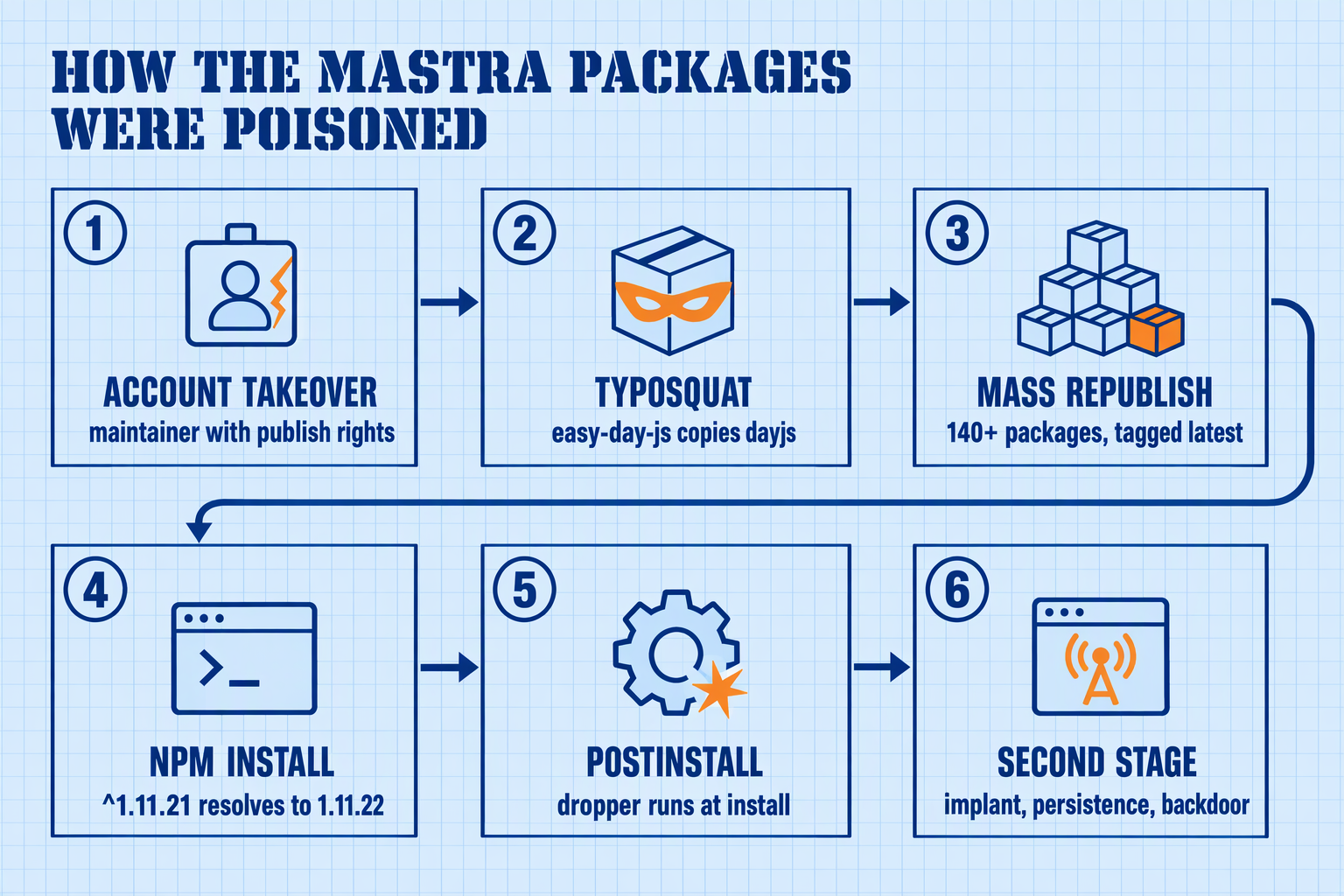
Researchers found the change in the registry, not in Mastra’s source repository: a stolen publishing credential, a lookalike package and a dependency range that admitted the poisoned version.
The way in was the npm account of a Mastra maintainer with publish rights across the @mastra scope. Mastra’s incident report says the maintainer’s machine was compromised after phishing from a hijacked LinkedIn account. The scope required two-factor authentication but allowed tokens that bypassed it. A token tied to that account republished the packages.
On 16 June, the day before the republishing, a different npm account published easy-day-js, a copy of the popular dayjs library that even claimed dayjs’s author and repository. Version 1.11.21 was clean bait. Version 1.11.22, published at 01:01 UTC on 17 June, added a postinstall script that ran an obfuscated dropper.
Eleven minutes later the hijacked account started republishing Mastra packages: more than 140 by Microsoft’s and Socket’s count, 116 by Mastra’s own. Each new version added a dependency on easy-day-js@^1.11.21, which resolved to the poisoned 1.11.22, and for the mastra CLI Microsoft found that was the only change. Every poisoned version was tagged latest, and nothing in Mastra’s GitHub repository matched it.
flowchart TB
    accTitle: Timeline of the Mastra compromise in UTC
    accDescr: On 16 June at 07:05 UTC a clean bait version of easy-day-js was published. At 01:01 on 17 June the poisoned version 1.11.22 followed. From 01:12 to about 02:36 the hijacked account republished more than 140 Mastra packages with the new dependency, including mastra 1.13.1 at 01:20. Mastra learned of it at 03:45, had unpublished or deprecated the affected versions it identified by 06:57 and published clean versions at about 08:00. Microsoft attributed the campaign to Sapphire Sleet on 19 June.
    T1["16 Jun 07:05
easy-day-js 1.11.21, clean bait"]:::prep
    T2["17 Jun 01:01
easy-day-js 1.11.22 adds the postinstall dropper"]:::bad
    T3["17 Jun 01:12 to about 02:36
140+ Mastra packages republished,
mastra 1.13.1 at 01:20"]:::bad
    T4["17 Jun 03:45
Mastra learns of it"]:::resp
    T5["17 Jun 06:57
Mastra's identified versions
unpublished or deprecated"]:::resp
    T6["17 Jun about 08:00
clean versions published"]:::fixed
    T7["19 Jun
Microsoft attributes it to Sapphire Sleet"]:::fixed
    T1 --> T2 --> T3 --> T4 --> T5 --> T6 --> T7
    classDef prep fill:#cce5ff,stroke:#1f6feb,color:#000
    classDef bad fill:#ffd6d6,stroke:#c0392b,color:#000
    classDef resp fill:#fff4c2,stroke:#b7950b,color:#000
    classDef fixed fill:#e6ffed,stroke:#2da44e,color:#000
Within about six hours of the first poisoned Mastra publish, Mastra had unpublished or deprecated the affected versions it identified. That’s the early exposure window an age gate helps with. Deprecation doesn’t prevent installation, though, so the deprecated versions could still reach an install later.
The publishing metadata gave it away. Microsoft says its monitoring spotted the anomaly within minutes, and it wasn’t the only one watching: Socket flagged easy-day-js within six minutes of publication. Up to 1.13.0, mastra releases came out of the project’s own GitHub Actions workflow, authenticated with OpenID Connect. Then 1.13.1 appeared, published outside that workflow from the maintainer’s account, with an anonymous email address on the publisher record. Keep that detail in mind, because one of the controls below checks for it.
OSV records a separate malicious clone of the mastra CLI published the day before. That looks like a rehearsal, but the advisory doesn’t establish a link to the same operator. Microsoft separately attributes the earlier Axios npm compromise to Sapphire Sleet.
What the payload did
The postinstall hook ran a dropper that left markers in the temp directory and fetched a second stage. The code ran with the install process’s permissions, not inside a separate agent sandbox.
The second stage persisted across Windows, macOS and Linux, using names that resembled Node version-manager files. Microsoft observed remote task execution, browser-history collection and wallet-extension inventory. Socket’s recovered sample didn’t copy wallet secrets, saved passwords or cookies, but follow-on code could still steal them. On some hosts Microsoft also observed a PowerShell backdoor and a service running as SYSTEM. The runbook below focuses on what to look for rather than the payload mechanics.
For pipelines, this is the part of Microsoft’s write-up that matters most. The dropper fired during installation, so exposure had nothing to do with whether your code used Mastra. If a laptop or build agent installed or updated a project that resolved one of the bad versions while they were up, directly, through another dependency or through npx, treat it as exposed.
Why agent teams should care
Mastra isn’t a stray utility. It’s a popular framework for building agents and workflows in TypeScript, so it lives in the same repositories and build agents that hold model keys and deployment rights.
It could reach developer machines a second way. Mastra’s MCP docs server setup shows npx -y with no pinned version. @mastra/mcp-docs-server 1.1.47 was affected, so starting a coding agent could have pulled in the compromised server if it needed to resolve or install the package. That puts dependency installation on the agent’s start-up path, even if a cached copy means nothing is downloaded that time.
Automation made it worse. In an early incident report, a team reported that their dependency bot pulled the poisoned versions within minutes of publication, and a failing CI install is how they noticed.
Install time is the blast radius
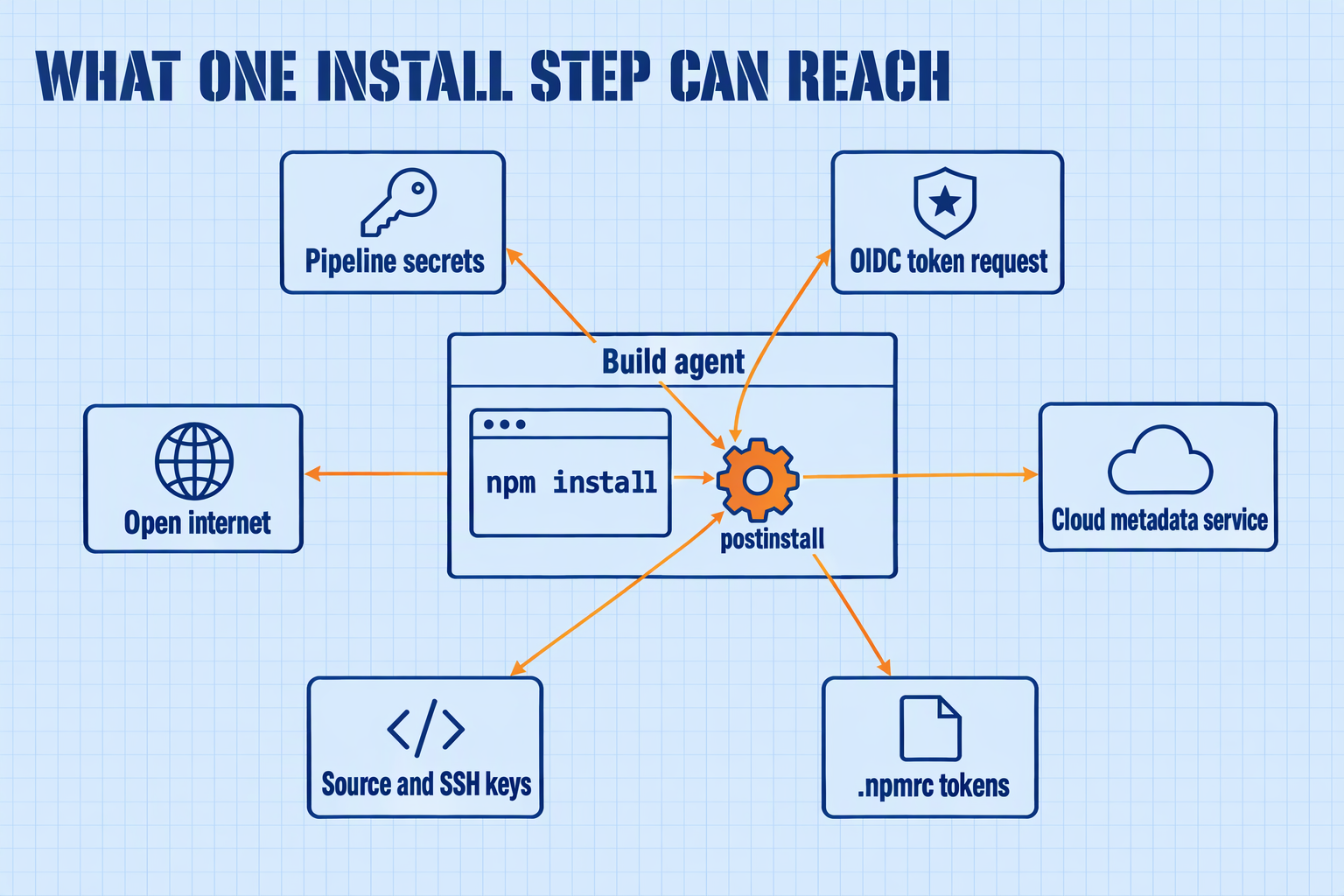
A postinstall script runs as the build user with the install process’s environment. A scanner later in the job can’t prevent code that’s already run.
On a build agent, that reach usually includes:
- Pipeline secrets in environment variables, including anything an earlier step exported.
- OIDC token requests in a GitHub Actions job with
id-token: write. Cloud trust policy still determines which requests can be exchanged for cloud access. In Azure Pipelines, anything mapped into the step’s environment, includingSystem.AccessToken, is readable by the processes that step starts. - The cloud metadata service on a runner with a reachable managed identity endpoint.
- Feed credentials. Azure Pipelines’
npmAuthenticate@0adds credentials to the specified.npmrcfor the build. For an in-organisation feed this uses the build identity. Limit that identity’s permissions as well as the feed role. - The checked-out source, signing material and SSH keys readable by the build user.
- Network destinations reachable from the worker. That matters both for fetching a payload and sending data out.
On a developer machine, add browser profiles, crypto wallets, cloud CLI sessions and the coding agent’s own credentials. Wallets were this actor’s main interest, but nothing stops the next one wanting your Azure session.
So I treat the install step as untrusted code execution, because that’s what it is.
If an affected version reached you
flowchart TB
    accTitle: Response runbook for a poisoned npm dependency
    accDescr: Stop suspect builds, isolate affected machines and revoke exposed access. Establish scope from lockfiles, caches, feeds and logs. Preserve evidence, quarantine bad packages and issue fresh credentials from a trusted host before resuming on clean runners.
    S["Stop suspect builds, isolate hosts
and revoke exposed access"]:::bad
    F["Establish scope
lockfiles, caches, feeds, CI logs"]:::step
    P["Preserve evidence
and quarantine bad versions"]:::step
    R["Issue replacements
from a trusted system"]:::step
    B["Rebuild
clean runner, known-good versions"]:::ok
    S --> F --> P --> B
    S --> R --> B
    classDef step fill:#cce5ff,stroke:#1f6feb,color:#000
    classDef bad fill:#ffd6d6,stroke:#c0392b,color:#000
    classDef ok fill:#e6ffed,stroke:#2da44e,color:#000
Contain and revoke first. Don’t wait for a positive malware scan or a cache purge to revoke access. Keep replacement credentials away from affected jobs, and don’t resume builds until you have a clean runner and dependency inputs.
- Stop suspect jobs, isolate affected hosts and revoke credentials the install could reach. For managed identities and federated credentials, check sign-in and activity logs and restrict or remove suspect grants or trust relationships. There’s no stored identity secret to rotate.
- Establish scope. Compare lockfiles, caches and CI logs against Socket’s affected-package list and the advisories. The poisoned versions include
mastraandcreate-mastra1.13.1,@mastra/core1.42.1 and@mastra/mcp-docs-server1.1.47. Search foreasy-day-jsin Git history withgit log --all --oneline -S easy-day-jsand check developers’npxcaches. - Check 01:00 to 08:00 UTC on Wednesday 17 June: 13:00 to 20:00 in New Zealand and 11:00 to 18:00 in Sydney. Look for later installs from caches too. Old logs may have expired. GitHub Actions defaults to 90 days, and Azure Pipelines uses the project’s retention settings.
- Preserve forensic evidence and look for the implant. Microsoft’s indicators include temp markers, unexpected JavaScript files, persistence changes and network connections. Rebuild an affected runner from a known-good image rather than cleaning it in place. Review artefacts produced by exposed builds before trusting them.
- Quarantine or purge the bad versions from caches and upstream-enabled Azure Artifacts feeds. A feed can still serve a saved copy after npm takes it down. Issue replacement credentials from a trusted system, then rebuild from a reviewed lockfile on a clean runner.
These checks cover the main markers and persistence Microsoft and Socket documented. A miss doesn’t prove a machine is safe, so treat the result as one input rather than a verdict. Run them on developer machines and on any self-hosted build agent that could have installed the packages; on a build agent, the Run key sits in the hive of the account the agent runs as.
1 | # macOS and Linux: the dropper's markers and the implant's persistence |
1 | # Windows (run elevated): Run values in every loaded user hive, drop locations and the service |
For network evidence, use retained telemetry. Defender advanced hunting defaults to 30 days of native Defender data, or up to 90 days of supported data with an eligible ISOC licence. Neither reaches June from November. This example uses a Microsoft Sentinel workspace that still has DeviceNetworkEvents for the period and uses its TimeGenerated column. Check firewall or flow logs for runners that aren’t onboarded to Defender for Endpoint. An empty query without the right data is not evidence that the runner was unaffected.
1 | // Connections to the campaign's infrastructure, from Microsoft's indicators. |
Five controls for agent build pipelines
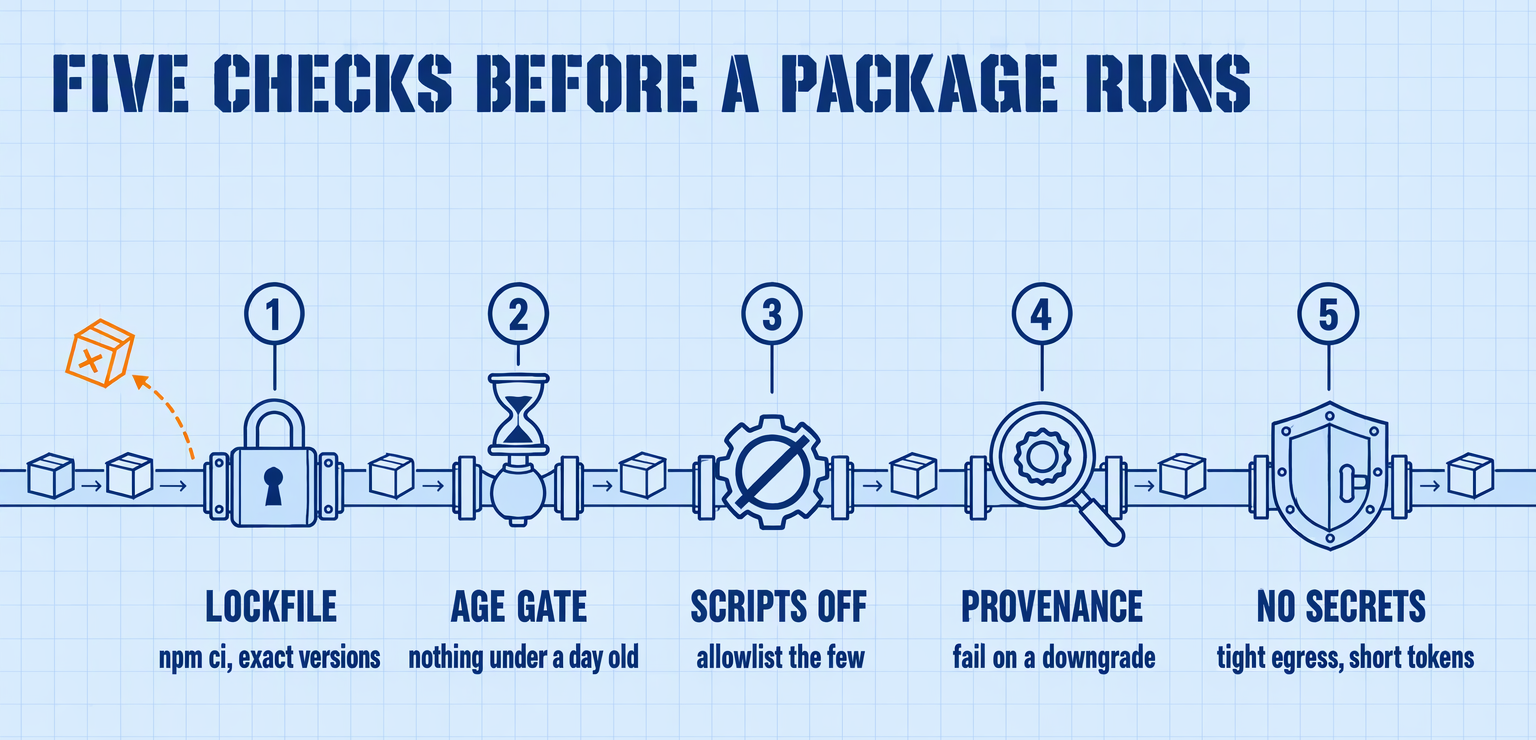
Each check breaks a different link. A lockfile controls what you install, while the script and runner controls limit what the installed code can do.
1. Install only from a lockfile
Commit the lockfile and install with npm ci, pnpm install --frozen-lockfile or yarn install --immutable. npm ci fails if the lockfile and package.json disagree and doesn’t rewrite either. A trusted lockfile from before the poisoned versions would have kept CI on the versions it already used.
A lockfile pins dependencies, not trust. Review lockfile changes, and don’t assume npx some-tool is covered by the project lockfile if it has to fetch the package. Pinning the requested tool version helps. Installing it as a locked dependency and invoking that local binary also locks its transitive dependencies.
2. Make new versions wait
Poisoned releases rarely last long. GitHub’s cooldown analysis cites a review of 21 widely reported incidents from 2018 to 2026 that found a cooldown could have filtered out most of them, and that’s why Dependabot now waits three days by default. Mastra fits the pattern: easy-day-js 1.11.22 was eleven minutes old when the first poisoned Mastra package was published, and Mastra reported unpublishing or deprecating the 116 affected versions it identified within about six hours. A strict one-day gate on fresh resolution would have kept the new versions out during those first hours. It isn’t the whole answer, though: npm wouldn’t let Mastra unpublish six of them, so they were only deprecated, which is one more reason to keep install scripts off as well.
Several clients and update bots have an age gate. Package managers can enforce it during resolution; update bots only delay their own proposals. The units differ, so check them.
- npm 11.10 and later:
min-release-agein days. Off by default, including in npm 12. - pnpm 10.16 and later:
minimumReleaseAgein minutes. Defaults to 1,440 minutes (one day) from pnpm 11. - Yarn 4.12 and later:
npmMinimalAgeGateas a duration. Defaults to1d. - Bun 1.3 and later:
minimumReleaseAgein seconds under[install]inbunfig.toml. Off by default. - Dependabot:
cooldownin days. Defaults to three days for version updates on github.com. - Renovate:
minimumReleaseAgeas a duration. Off by default;security:minimumReleaseAgeNpmenables a three-day wait for npm updates.
In npm, min-release-age filters fresh resolution. It won’t stop npm ci from installing a version that’s too new if it’s already pinned in the lockfile. Apply the gate when you create or update the lockfile, and review newly resolved packages before committing it.
1 | # .npmrc (npm 11.10 or later) |
pnpm 11’s built-in 1,440-minute gate isn’t strict. It can fall back to a newer version if nothing in the requested range is old enough. Set the age and strict mode explicitly so resolution fails instead.
1 | # pnpm-workspace.yaml (pnpm 11 and later) |
And for Dependabot, if you want a longer wait for major versions:
1 | # .github/dependabot.yml |
Dependabot’s security updates skip the cooldown. GitHub announced the three-day default for github.com version updates and GitHub Enterprise Server 3.23. A gate also needs the real publish time. Azure Artifacts users report seeing cache-insertion timestamps instead of the original registry timestamps. pnpm can skip checks when timestamps are missing unless you set minimumReleaseAgeIgnoreMissingTime: false. Test the configured behaviour against your own feed rather than assuming it mirrors npm metadata.
If you’re on GitHub Enterprise Cloud, the GitHub package firewall is in public preview for npm. Its default minimum age is one day, and it only applies to requests routed through the firewall.
3. Turn dependency install scripts off
The dropper only ran because npm ran a stranger’s postinstall script. That’s no longer the default in most clients:
- npm 12 skips dependency lifecycle scripts unless they’re approved.
npm approve-scripts --allow-scripts-pendinglists what needs review without changingpackage.json. After reviewing the installed version or versions,npm approve-scripts <package>records the approval there, pinned to the installed version by default. Setstrict-allow-scriptsif unreviewed scripts should fail the install rather than be skipped. - npm 11 still runs dependency scripts by default. Use
npm ci --ignore-scripts. If a package really needs a build step, review it and rebuild only that named package in an isolated job. - pnpm blocks dependency build scripts by default from version 10. Version 11 uses the
allowBuildsmap and fails on unreviewed scripts by default. - Yarn 4.14 and later turn off third-party postinstall scripts by default.
- Bun ships a curated default allow list. Setting
trustedDependenciesreplaces that list; an empty list disables it entirely.
Check which npm your build agents actually run. The npm that ships with your Node.js version may be older than 12, and hosted runner images can lag behind the latest npm. The GitHub package firewall also blocks newly introduced install scripts by default.
4. Fail when provenance goes backwards
This is the signal Microsoft says it used to spot the attack. Earlier Mastra versions were published by a GitHub Actions workflow through npm’s trusted publishing, with provenance attestations. The poisoned ones were published outside that workflow with a personal token, and carried none.
The pnpm trust policy can turn that into a failed install. With trustPolicy: no-downgrade, pnpm refuses weaker trust evidence than an earlier release of the same package. Review any exception before adding it to trustPolicyExclude. The GitHub package firewall blocks missing attestations on packages that previously had them. npm audit signatures verifies registry signatures and available attestations; it isn’t an install-time downgrade check or a requirement that every package have provenance.
The limits are real. Provenance tells you where a package was built, not that it’s safe. A brand-new package like easy-day-js has no history to downgrade from. One Azure Artifacts user reports that upstreams don’t pass through the provenance metadata pnpm needs. If your feed strips that evidence, don’t count on the policy to distinguish an ordinary release from a downgrade.
If you publish packages, internal tools and MCP servers included, trusted publishing doesn’t switch off alternate publishing credentials. Configure npm’s two-factor authentication and token policy to disallow publishing tokens on packages that publish through OIDC. That would have closed the token route Mastra identified. npm’s current token guidance says that since August 2026, bypass-2FA tokens can’t perform account-identity or account-governance actions. They can still publish directly where package policy permits it; npm documents January 2027 for removing that ability. Verify the rollout status before planning a publishing migration around that date.
5. Keep the install step poor
Split building from deploying. The build job has no deployment secrets, cloud identity or OIDC permission. If it needs a private registry credential, use a short-lived feed credential with only the access it needs. Restrict egress to the registry and CI service endpoints. The separate deployment job takes an artefact from the trusted build, runs behind an approval and uses federation without installing project dependencies.
These are pipeline templates, not deployment test results. For GitHub Actions, replace each <commit-sha> with a reviewed action commit and scope Azure trust to the intended repository and deployment environment. The job split doesn’t configure runner egress or make a tainted artefact safe.
1 | # GitHub Actions: the install job can't mint a cloud token, the deploy job never installs |
The Azure Pipelines version has the same shape. Provision the named pools and configure the production environment’s checks and the workload identity federation service connection separately. The build pool needs Node.js, npm, zip, an .npmrc pointing to the feed and outbound access to the feed and required Azure DevOps endpoints, but not a managed identity. The deployment pool needs Azure CLI. Both pools use Linux workers in this example.
1 | # Azure Pipelines: install and build on a locked-down pool, deploy from a separate job |
On the network side:
- Azure DevOps: Run Managed DevOps Pools in your own virtual network and route egress through an FQDN-aware firewall or proxy. Allow the feed and required Azure DevOps endpoints. An NSG on its own can’t filter by host name.
- GitHub Actions: Azure private networking for larger runners lets you apply your network rules in a supported region. Australia East is listed; New Zealand North isn’t. GitHub’s native egress firewall is in early access for Linux runners, including standard runners. Until that is available to you, use larger runners with private networking or tightly controlled self-hosted runners for jobs that require enforced egress.
Test that the build works with only those destinations. Keep the restriction on during compilation and tests, where dependency code can still run even if install scripts are disabled.
Agents install things too
Agents pull packages outside your pipelines too. Three habits matter for agent teams.
- Pin and lock MCP servers. A version on
npx -y some-mcp-serverpins the requested server, not its transitive dependencies when it needs to install. Put the server in a tools project with its own lockfile or bake it into the agent’s image. - Package at build time. Apply the controls in CI, then run that container image in production without resolving packages at start-up.
- Apply the same rules in agent sandboxes. A repository-level
.npmrctravels with the code, but for pnpm 11 usepnpm-workspace.yamlfor the dependency policy. Keep sandbox egress restrictions outside the agent’s control.
flowchart TB
    accTitle: Runtime installs versus build-time packaging for agents
    accDescr: If an agent resolves dependencies at runtime, it can pick up a newly published version. With build-time packaging, CI installs from a lockfile behind an age gate with scripts off, builds and scans one image, and production agents run it without resolving packages.
    subgraph RUN["Runtime installs"]
      R1["Agent starts"]:::agent
      R2["npx or npm install
may resolve versions at start-up"]:::bad
      R3["New releases can run
before anyone reviews them"]:::bad
    end
    subgraph BLD["Build-time packaging"]
      B1["CI: lockfile, age gate,
scripts off"]:::ok
      B2["One image, built and scanned once"]:::ok
      B3["Agent runs the image
and installs nothing"]:::agent
    end
    R1 --> R2 --> R3
    B1 --> B2 --> B3
    classDef agent fill:#cce5ff,stroke:#1f6feb,color:#000
    classDef bad fill:#ffd6d6,stroke:#c0392b,color:#000
    classDef ok fill:#e6ffed,stroke:#2da44e,color:#000
My take
The Mastra attack wasn’t clever code. It was clever logistics: one stolen publishing token, one lookalike dependency and one caret range. The defences that would have stopped it look boring on a slide, which is why they get skipped.
The biggest change this year is that defaults have started to flip. Don’t assume the package manager on your build runner has those defaults. Check its version and settings, then review each dependency that needs an install-time exception.
My order: lockfile installs and scripts off first, a resolution age gate and an update-bot cooldown next, then split installs from deployments and remove cloud identities from build pools. Introduce provenance checks once you’ve confirmed your registry or proxy preserves the evidence they need.
Know the limits. A cooldown does little against a backdoor that sits quietly for months or a compromised build system, and GitHub says as much. Provenance proves origin, not innocence. And if your npm traffic goes through Azure Artifacts or any other caching proxy, test your age gate and trust policy against it before you count on them, and lean harder on scripts off and egress control until you’ve confirmed they work.
Key takeaways
- Treat dependency installation as untrusted code execution, even if application code never imports the dependency.
- Stop suspect jobs and revoke access before rebuilding on clean runners. Check caches, feeds and previously published artefacts, not just the current lockfile.
- Keep installs locked, delay new releases and block unreviewed scripts. Reject provenance downgrades where supported; no one control covers everything.
- Give builds only the feed access they need, restrict egress and deploy from a separate job. Lock packages that agents would otherwise resolve at start-up.
References
- Microsoft Threat Intelligence: Mastra npm supply chain compromise and advanced hunting retention
- Mastra: Incident report
- Socket: Registry timeline and affected packages
- GitHub Advisory Database: Mastra CLI, Mastra core and MCP docs server
- npm: Version 12 security defaults and min-release-age configuration
- pnpm: Version 11 release notes
- Yarn: Default script policy and age gate
- Bun: Lifecycle script policy
- GitHub: Dependabot cooldown and package firewall
Related posts
- GitHub Copilot Harness Security: Patch, Pin and Govern Your Coding Agents: the same patch and pin discipline, applied to the coding agents themselves.
- AI Agents Exploit Leaked Keys in Minutes: Go Keyless on Azure: getting rid of stored secrets, the step before this one.
- AI Agent Containment on Azure: Stop Buttons, Identity and Network Controls: default-deny egress and short-lived identity for running agents.
- Governance for AI Agents (Part 1): The Gap, the OWASP Agentic Top 10, and Where AGT Fits: the governance gap that pipelines sit inside.
- AKS Static Egress Gateway: Per-Namespace Static Egress IPs: controlled egress when workloads share a cluster.
Image Credits
- Cover image generated by Copilot
Your Agent SDK Carried the Payload: Hardening Agent Build Pipelines After the Mastra npm Compromise