Who Decides Which MCP Tools an Agent Can Call? Registry, Gateway, Identity and Network After Ignite
TL;DR
After Ignite, five layers have a say in an agent’s MCP tool call: the registry, the gateway, Entra identity, the network and the agent runtime. Most of the new controls are preview, and several of them overlap.
Don’t switch them all on and hope. Give each decision one owner and one enforcement point: the registry records which servers exist, the gateway decides which tools each agent can reach, identity decides whether this agent gets a token right now, the network catches traffic that skips the gateway, and the runtime checks the arguments before anything runs.
In a hurry? Jump to the five layers, the ownership split or the default for a new agent, then come back for the gaps.
Ask a team which tools their agent can call and you’ll usually get a list from the developer’s code. Ask who decided, and the room goes quiet.
After Ignite there’s a different problem. Microsoft has tool controls in Agent 365, Entra, Global Secure Access, AI Gateway, Foundry and Azure Policy. Several can block the same call, and many are still in preview. More controls don’t make it obvious who owns each decision.
This post extends my Governance for AI Agents series. Part 1 put a deterministic policy check in front of every tool call, and AI Agent Containment on Azure built stop buttons and containment around the agent. This one is about the decision itself: which layer owns which tool decision, and what a sensible default looks like for the next agent your teams ship.
Australia’s rapid review of an AI-driven cyber incident shows what’s at stake. The Australian Signals Directorate found that the agent wasn’t properly contained and lacked timely human oversight. The government accepted all 18 recommendations. Containment and oversight both need someone who owns them.
The product details below were checked against Microsoft, GitHub and Model Context Protocol sources on 26 November 2026.
Five layers, one tool call
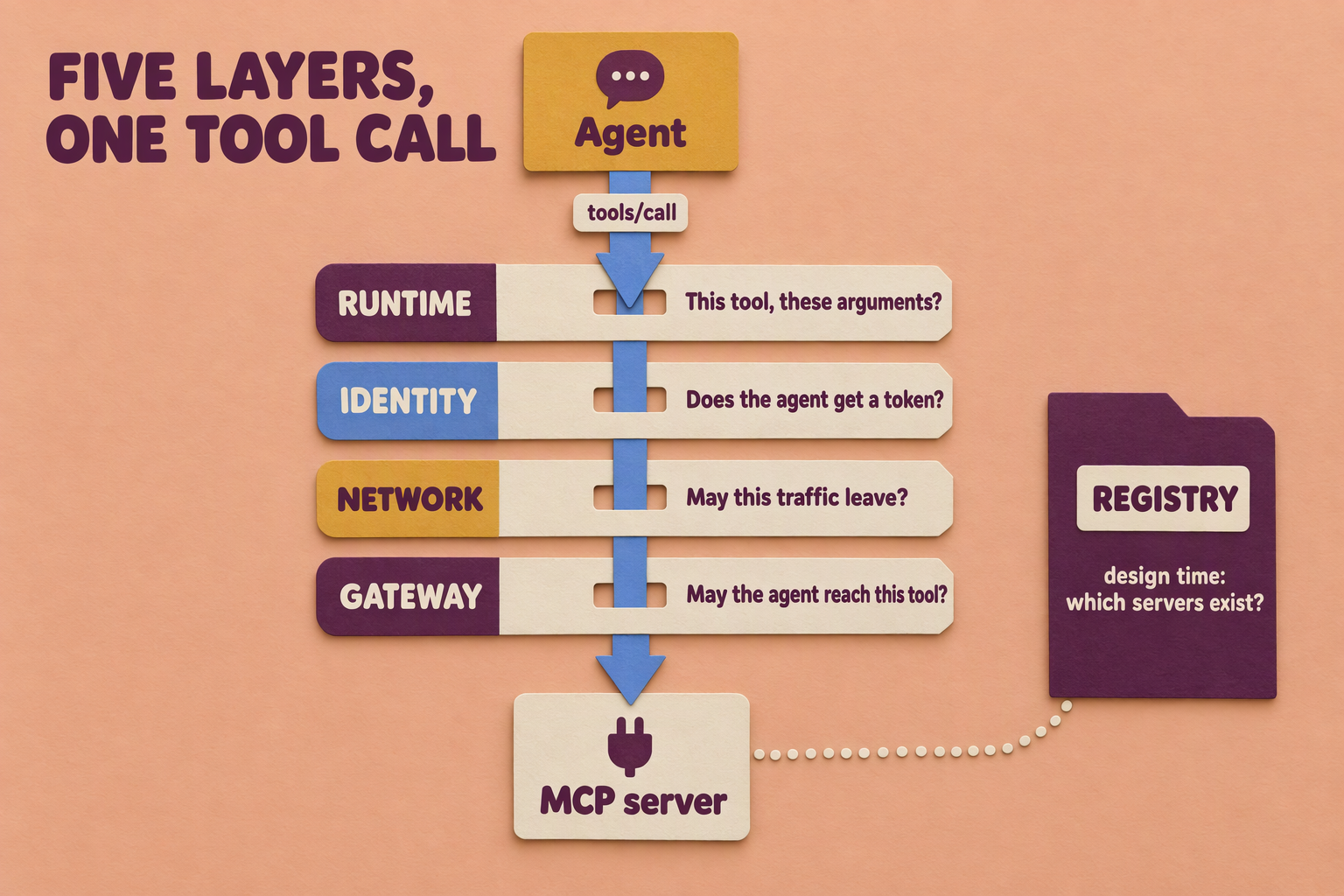
Each layer answers a different question. Trouble starts when two layers try to answer the same one, because then nobody knows which allow list is authoritative. The diagram shows one possible call path. The identity decision happens when a token is issued or refreshed, not on every call.
As at 26 November, Agent 365 plugin and skills governance, AI Gateway MCP federation and tool lists, and Foundry’s managed hosted-agent egress controls are generally available. The layer-by-layer guide below calls out previews and cases where announcements and docs disagree.
Layer 1: the registry records which servers exist
The registry answers “which MCP servers are we prepared to use in this organisation?” It records the decision; the runtime enforces it. The Agent 365 tools inventory shows supported servers and their consumers. Blocks take effect in experiences that use the Agent 365 Tooling Gateway or through a connected gateway, not on every MCP client in the organisation.
Look before you block. The registry helps identify who would lose access when a server goes dark.
What admins can do today:
- Block or unblock a whole MCP server, which disables all its tools, and see the plugins that use it so they can block those too.
- Turn individual tools on or off. This is still rolling out and only works for supported server types.
- Approve or reject MCP server registration requests on the Requests tab, which is preview. The flow needs the AI Administrator or Global Administrator role, Entra consent is a separate step after approval, and a server can take up to 30 minutes after consent to appear in Copilot Studio.
- Decide who can use each plugin, and which publisher categories are allowed.
Foundry has a private tool catalogue in preview. Admins register remote MCP servers in Azure API Center, and developers need the Azure API Center Data Reader role, which can take up to 24 hours to propagate. It’s a discovery list, not a fence. Back it with project tool controls and configure the route in AI Gateway or API Management; Foundry doesn’t register the server with a gateway for you.
Coding agents have their own registry
GitHub Copilot uses GitHub’s enterprise managed settings, not the Agent 365 registry. The allowedMcpServers and deniedMcpServers lists govern supported server configurations. A deny takes precedence; built-in servers aren’t restricted by those lists. The older registry restriction is in preview and can also block Copilot connectors.
GitHub announced strictPluginOnlyCustomization on 16 November. For the categories you choose, it keeps skills, custom agents, Copilot hooks, MCP servers or executable Copilot extensions from loading from standalone user and project settings. Eligible plugins and managed settings can still supply them. This is for GitHub Enterprise Cloud users with eligible Copilot Business or Enterprise licences. Plugin-only isn’t a marketplace allow list, so pair it with strictKnownMarketplaces.
One caution from the same week: VS Code 1.147 lets admins allow the Claude and Codex harnesses through vscode.allowedHarnesses, but those sessions don’t inherit Copilot’s managed permission, sandbox, MCP and plugin controls. Check the controls each harness actually enforces before allowing it.
Layer 2: the gateway decides which tools each agent can reach
The gateway enforces which tools an agent can reach at run time. In AI Gateway, MCP federation and tool lists are GA. A tool outside the allow list doesn’t appear in tools/list and can’t be called. A blocked tool can still appear but won’t run. Shape what agents see with the allow list and keep the block list as the backstop.
Those lists apply to the gateway’s MCP server, not to an individual agent. To give two groups different toolsets, expose separate gateway MCP endpoints with their own lists and scope each group’s AI Gateway Tools User role to the relevant server.
Two newer controls sit on top, both preview:
- Agent Hooks ask your own decision service for an allow or deny verdict before a tool runs, after it finishes, or both. They fail closed by default but can be configured to fail open. Discovery calls such as
initializeandtools/listdon’t trigger a hook. The gateway doesn’t offer a transform or approval verdict here. - Tool threat protection uses Defender and Purview to evaluate tool requests and results. It’s one policy per server, runs after the gateway’s existing policies and requires a delegated user token. An evaluated invocation without a usable token fails; don’t rely on this control for app-only agents. Defender’s Block mode fails closed, while Audit doesn’t block.
sequenceDiagram
    accTitle: One tool call checked by the runtime, the gateway and an Agent Hook
    accDescr: The agent's host asks agent controls about the proposed call at pre_tool_call and gets allow, deny or transform. If allowed, the call reaches AI Gateway, which checks its tool lists and then asks an Agent Hook decision service, which can allow or deny. Only then does the MCP server run the tool. After the tool runs, a post-call hook can still withhold the result.
    autonumber
    participant AG as Agent host
    participant AC as Agent controls
    participant GW as AI Gateway
    participant HK as Agent Hook service
    participant S as MCP server
    AG->>AC: pre_tool_call with name and arguments
    AC-->>AG: allow, deny or transform
    AG->>GW: tools/call
    GW->>GW: Tool allow and block lists
    GW->>HK: Before the call
    HK-->>GW: allow or deny
    GW->>S: Run the tool
    S-->>GW: Result
    GW->>HK: After the call
    HK-->>GW: allow or deny the result
    GW-->>AG: Result or error
A deny after the call can withhold the result, but the tool has already run. Put any check meant to stop a write before the call.
When you connect Agent 365 to AI Gateway, Agent 365 boundaries become gateway policy. A one-time tenant consent grants the A365 MCP Gateway Policy Operator role. Blocking a server returns HTTP 403. Blocking a single tool needs a static list of tools and returns HTTP 200 with isError: true, so watch tool errors rather than HTTP status alone.
The status needs care. The API Management Ignite announcement calls the integration GA, while the Agent 365 announcement still lists AI Gateway support as preview. Verify the exact gateway and governance action before relying on it in production.
The catch is in one line of the docs: Agent 365 doesn’t automatically route agents through a customer-hosted gateway. Point each agent at the gateway’s MCP endpoint and stop direct access at the backend. For app-only tools, allow only the gateway identity. Where a tool requires a delegated user token, validate that token at the server and restrict the network path to calls from the gateway.
API Management can host MCP servers too, in the Developer, Basic, Standard and Premium tiers and the v2 tiers, but not in workspaces. Agent 365’s integration covers only the v2 tiers, where it can block whole servers. My earlier post, Azure AI Gateway Is GA, covers where each gateway fits.
Layer 3: identity decides whether this agent gets a token
Identity is where the agent stops being “the app” or “the user” and becomes something you can make a decision about. An Entra agent identity is a special kind of service principal. It’s created from a blueprint, which holds the credentials, and it can have a sponsor: the person or group accountable for it. Agent ID is available to all Entra customers, but extending Entra’s security features to agents needs Agent 365.
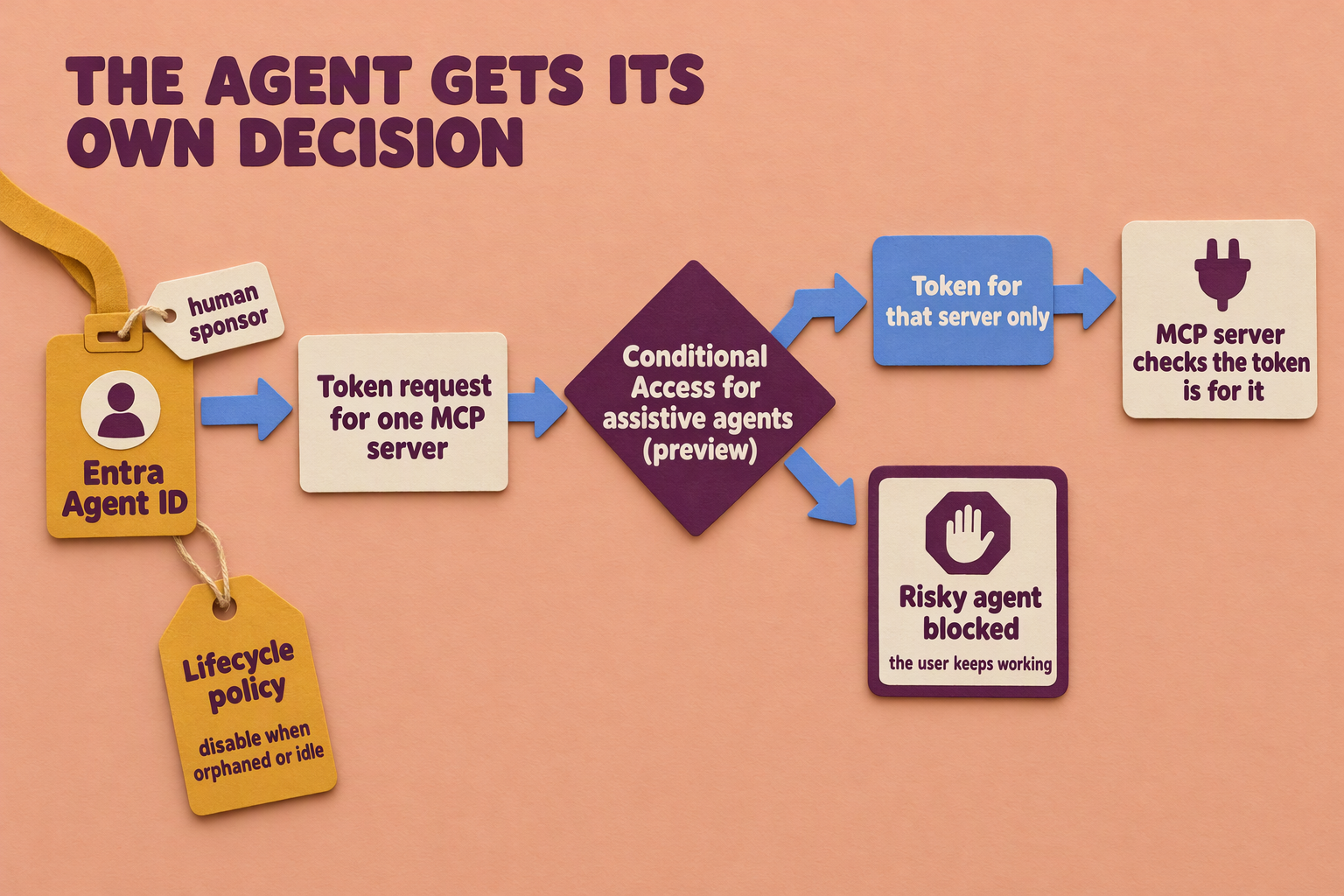
With Conditional Access for assistive agents (preview), a policy can say no to the agent without saying no to the person it works for.
What changed at Ignite:
- Defender and Global Secure Access discover local agents. Defender discovery is GA and network discovery in Global Secure Access is preview. Automatic Agent IDs start with GitHub Copilot CLI and Claude Code, in preview.
- Conditional Access for assistive agents can block a risky local agent without blocking the employee’s own access.
- Lifecycle policies can check sponsorship and recent activity. Microsoft’s Entra Ignite post calls them GA and describes disabling agents at 60 days. The Learn guidance for the default inactivity policy still says preview and lists notification at 60 days, disabling at 90 and deletion at 455. The default policy doesn’t require a licence, but check whether it’s enabled and applies to the agent in your tenant.
Three details from Conditional Access for agents matter for design. First, policies evaluate token issuance or refresh. Don’t expect a new block to stop a session with an existing valid token unless the resource and scenario support Continuous Access Evaluation. An API key doesn’t use this token flow at all.
Second, Conditional Access evaluates the token’s resource audience, not an arbitrary MCP URL or tool name. It can stop token issuance for a server registered as its own Entra resource. When the caller requests a token for AI Gateway, however, Conditional Access sees the gateway audience. Gateway RBAC and tool policy distinguish the MCP servers and tools behind it. A downstream OBO exchange can trigger another Conditional Access evaluation for the backend resource.
Finally, target each token subject you use. Delegated access evaluates policy for the signed-in user, app-only access for the agent identity, and agent-user access for the agent’s own user account through the separate Agent Users assignment. A policy targeting the agent identity doesn’t cover those other subjects. Check licensing for the specific policy, especially agent-risk policies. Microsoft’s preview for sensitive actions and destinations isn’t evidence that Conditional Access can govern arbitrary calls on your own MCP server.
The server has a say too
Don’t forget the last hop. The MCP HTTP authorisation spec builds on OAuth 2.1. MCP authorisation is optional, but a server that implements this flow must publish Protected Resource Metadata and validate that each token was issued for it. Clients identify the intended resource, and the server must not pass the received token through to downstream services. The tools spec calls for input validation, access controls and rate limits on the server, and recommends keeping a human able to refuse tool calls.
The MCP Events extension makes a point worth repeating: receiving an event doesn’t authorise an action. Follow-up calls still need ordinary MCP authorisation, and clients should evaluate policy before turning an event into a tool call.
Microsoft’s Work IQ announcement describes a tenant-wide ceiling on actions, for example allowing read, create and update but not delete. Per-agent policy can only narrow that ceiling. For agents registered in Agent 365, Work IQ checks their policy on each call under the agent’s identity. This applies to traffic through Work IQ, not to every route to Microsoft 365 data. Check availability of this policy for your tenant.
Layer 4: the network catches what skips the gateway
The network layer is your backstop for agents that talk to servers nobody put behind a gateway. There are two controls, one for devices and one for hosted agents.
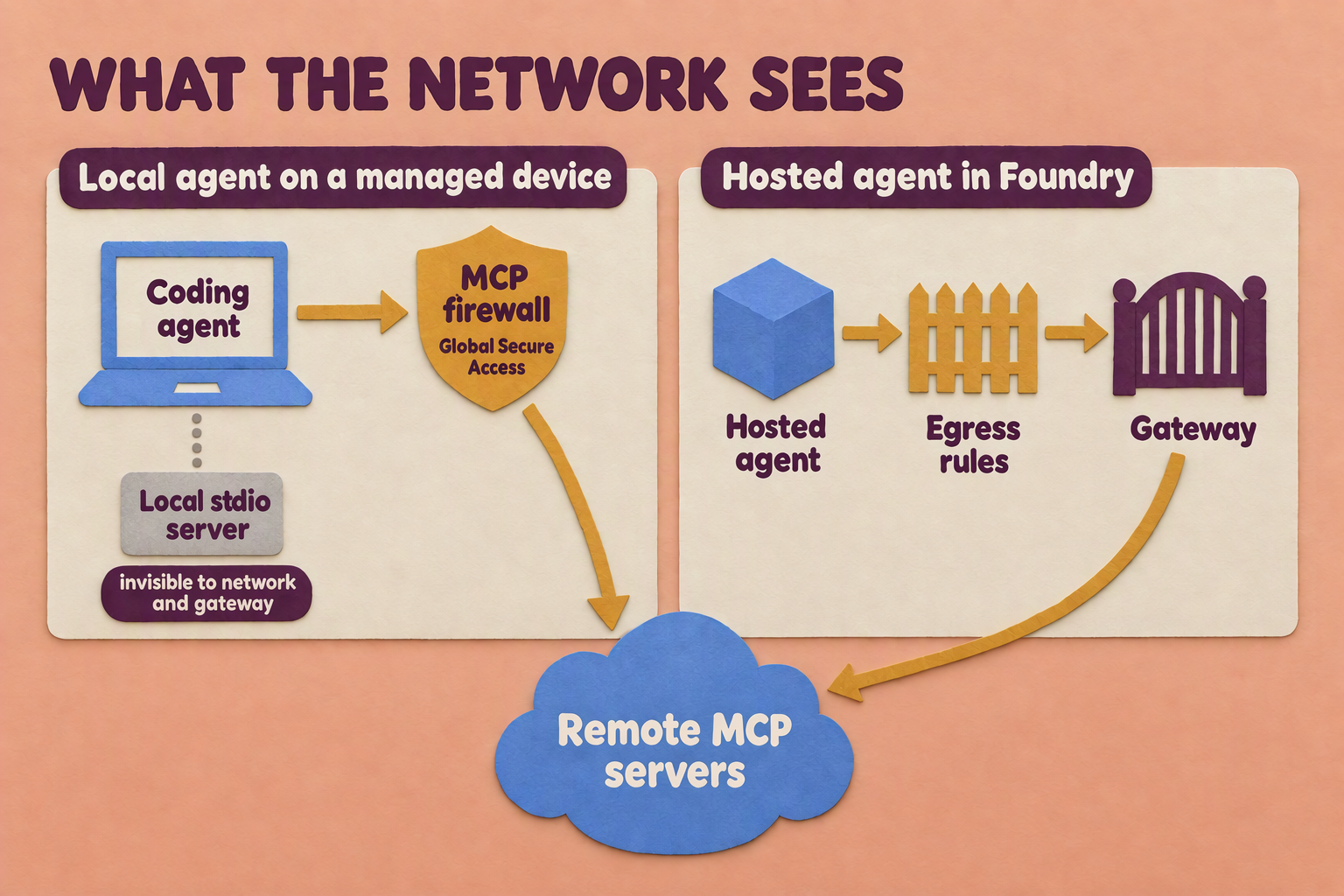
The network can catch a request to an unapproved remote server. It can’t see the local stdio exchange. A local server process can still initiate its own outbound connections, which need their own controls.
Managed devices: MCP firewall in preview
Global Secure Access rules can match server URLs, tools, resources, prompts and other MCP request metadata. They can block unencrypted HTTP but don’t match tool arguments. The firewall covers supported remote HTTP traffic, not stdio or JSON-RPC batches. Check the Entra Internet Access licence, device join, TLS inspection and Conditional Access requirements before counting on it.
Hosted agents: egress rules
Foundry’s managed hosted agent egress controls are GA, with Transform rules still in preview. An agent references a guardrail that holds an ordered list of rules. One guardrail can serve many agents, so treat write access to it like write access to every agent that uses it.
Rules match on host and path, and the first match wins. That doesn’t distinguish two MCP tools served at the same endpoint. Foundry enforces the rules outside the agent’s sandbox. Start in Audit with a default of deny, inspect what would be blocked, then switch to Enforce and deploy a new agent version. Test rewrites and header changes outside production: they’re applied in Audit mode too.
Layer 5: the runtime checks the call before it runs
The runtime is the earliest point that can see the arguments before a tool runs, which makes it a natural place for “this tool, but only like this”. In Foundry there are three checks, at three different moments.
flowchart TB
    accTitle: Three tool checks inside Microsoft Foundry
    accDescr: Azure Policy checks agent and toolbox configurations when they're saved, first in Audit mode and then Deny. The project's tool controls enforce an allow list at run time. Agent controls evaluate each proposed call, including its arguments, at pre_tool_call and return allow, deny or transform.
    C1["Azure Policy · when saved
approved tool types, MCP endpoints, connectors"]:::design
    C2["Project tool controls · at run time
default deny, explicit allowed tools"]:::rt
    C3["Agent controls · per call
name and arguments: allow, deny or transform"]:::percall
    C1 --> C2 --> C3
    classDef design fill:#cce5ff,stroke:#1f6feb,color:#000
    classDef rt fill:#e6ffed,stroke:#2da44e,color:#000
    classDef percall fill:#fff4c2,stroke:#b7950b,color:#000
With Deny assigned, Azure Policy stops a non-compliant configuration being saved where the policy applies. Project tool controls restrict supported runtime tool use. Agent controls can judge the specific call and its arguments.
Save time: Azure Policy
The approved and denied tool definitions accept tool types, MCP endpoints and MCP connectors, with Audit, Deny or Disabled effects. Don’t approve the broad mcp type if you need to restrict individual servers. Microsoft documents up to 30 minutes for enforcement changes and up to 12 hours for compliance results. These preview policies check toolboxes and Responses API prompt agents without the Copilot harness. They don’t inspect hosted agent code.
Run time: project tool controls
Set toolControls.defaultAction to Deny and list the allowed tools in allowedTools. This preview control has no audit mode, so try it in a non-production project. An Azure Policy assignment doesn’t change the list. Both controls can restrict endpoints and connectors rather than individual tools on a server. Scope those tools at the gateway, and don’t assume tool controls constrain outbound calls made directly by hosted agent code.
Per call: agent controls
Agent controls is a preview policy service built on the Agent Control and Agent Hooks specifications. Policies combine a Rego module with a manifest that binds evaluation to intervention points. The hosted service evaluates input, output, and before and after tool calls. Your host enforces the verdict. This example follows Microsoft’s authoring schema. It allows ticket reads and filters close requests to arguments that name the service desk queue. The ticket service still needs to authorise the write against its own records.
1 | package ticket_guard |
And the manifest that binds it to the moment before a tool call, with the tool arguments as the target. YAML is the authoring format here. For the hosted service, convert it to a JSON object in properties.acs and reference the separately uploaded Rego resource in properties.acsRegos, as the linked authoring guide describes.
1 | agent_control_specification_version: "0.4.0-alpha.1" |
Enforce this result before dispatch using the exact arguments that were evaluated, and deny the call on a failed or invalid evaluation. The queue string is a request argument, not proof of where the ticket lives. Resolve the ticket and check its actual queue and the caller’s authority in trusted code. The policy is a preflight filter, not an authorisation decision on its own. If you use the Agent Governance Toolkit, an open-source Microsoft project I work on, its policy layer also uses the Agent Control Specification from version 5.0. Check the manifest format for whichever runtime you use.
Toolboxes make the runtime layer easier to own. A toolbox gives supported tools, skills and agents a versioned surface and centralises downstream authentication. Prefer agent identity or user delegation over shared keys where the tool supports it.
Gaps and overlaps
The layers overlap on purpose, but they also leave holes. These are the ones I’d raise in a design review.
- Preview doesn’t mean absent, but it also doesn’t mean safe to depend on alone. Where Microsoft pages disagree, notably on Agent 365 gateway governance and Entra lifecycle policies, use the more cautious interpretation and verify your exact feature.
- Allow lists see destination or tool names, not arguments. Agent controls and Agent Hooks can apply your rules to arguments. Tool threat protection looks for threats. The server still has to validate inputs and authorise writes.
- Know what falls outside each control. That includes stdio, other coding harnesses, MCP servers defined in repository custom agents outside the managed lists’ scope, hosted agent code outside Foundry’s save-time policies, and app-only callers outside tool threat protection.
- Check the real path. Workspaces can’t host MCP servers, and Agent 365 won’t send traffic through your gateway automatically.
flowchart TB
    accTitle: Where each control sits, by timing and owner
    accDescr: Design-time controls are the Agent 365 registry and the Foundry private catalogue, owned by security, Azure Policy for approved tools, owned by the platform team, and GitHub managed settings, owned by the developer platform team. Run-time controls are Conditional Access for agents and the MCP firewall, owned by security, hosted agent egress rules and AI Gateway tool lists and hook policies, owned by the AI platform team, Foundry project tool controls, owned by the platform team, and agent controls, owned by application teams.
    subgraph DT["Design time"]
      R1["Agent 365 registry
security"]:::sec
      R2["Foundry private catalogue
security"]:::sec
      R3["Azure Policy for approved tools
platform team"]:::plat
      R4["GitHub managed settings
developer platform team"]:::dev
    end
    subgraph RT["Run time"]
      T1["Conditional Access for agents
security"]:::sec
      T2["MCP firewall
security"]:::sec
      T3["Hosted agent egress rules
AI platform team"]:::ai
      T4["AI Gateway tool lists and hook policies
AI platform team"]:::ai
      T5["Foundry project tool controls
platform team"]:::plat
      T6["Agent controls
application teams"]:::app
    end
    classDef sec fill:#ede9fe,stroke:#6d28d9,color:#000
    classDef ai fill:#e6ffed,stroke:#2da44e,color:#000
    classDef plat fill:#cce5ff,stroke:#1f6feb,color:#000
    classDef dev fill:#f1f5f9,stroke:#334155,color:#000
    classDef app fill:#fff4c2,stroke:#b7950b,color:#000
The owner isn’t always the team enforcing the decision. For example, security can own a server block that a gateway operated by the AI platform team enforces.
One owner per decision
This is the split I’d agree before the next agent goes live. By platform team I mean the team that runs your Azure landing zone, which may or may not also run API Management.
- Security owns the approved server inventory, Agent IDs and Conditional Access. It sets device policy in the MCP firewall and owns emergency blocks in Agent 365 for covered gateways and clients.
- The AI platform team owns the toolsets exposed via gateway MCP servers, scoped access to those servers and the egress rules for hosted agents.
- The cloud platform team owns the Foundry project’s tool list, keeping Azure Policy and the runtime tool controls aligned.
- The application team owns rules about the arguments a tool may receive. The AI platform team can operate the decision service. Pick one primary enforcement point for a rule: the agent host before dispatch or an AI Gateway Agent Hook.
- The developer platform team owns what coding agents may load, through GitHub managed settings. Microsoft 365 admins own the separate ceiling on actions through Work IQ.
The rule I apply when two rows seem to overlap: the owner is whoever carries the risk, and the enforcement point is the coarsest layer that can see what the decision needs and can’t be routed around. If the decision needs only the server, the registry records it and the gateway or Foundry’s tool policy enforces it. If it needs the tool name, the gateway. If it needs the arguments, agent controls or an Agent Hook.
A default for a new agent
This is the baseline I’d hand a team shipping its next agent on Azure.
- Register each server with a named owner. Enforce the approved inventory in the gateway and in the Foundry or GitHub controls that apply to the agent.
- Give the agent its own identity and a human sponsor. Set up a way to disable idle or orphaned identities where lifecycle controls are available.
- Route remote MCP through AI Gateway, or API Management where the workload needs it. Prefer exact tool names for writes and close direct paths to the servers.
- Default to deny in Foundry. Use an explicit runtime allow list and start the save-time policy in Audit before moving it to Deny.
- Check arguments before writes with
pre_tool_callor a fail-closed Agent Hook. Keep resource authorisation at the server. - Lock down outbound paths. Start hosted-agent egress rules at default deny, and use device controls for managed clients. Don’t rely on a preview control alone.
- Where supported, connect Agent 365 so security can block a server or tool without a deployment.
- Test what each layer should deny in a non-production environment, and repeat those tests after policy changes.
flowchart TB
    accTitle: Rolling out tool policy, audit first and then deny
    accDescr: Start with an inventory from the registry and gateway logs. Turn on policies in audit mode, review what would have been blocked, fix it or grant a time-limited exception with an owner, then switch to deny and enforce, keeping logs and the exception register as evidence and reviewing exceptions on a schedule.
    I["Inventory
registry and gateway logs"]:::step
    AU["Audit mode
Azure Policy audit, egress audit"]:::audit
    RV["Review what would
have been blocked"]:::step
    EX["Fix it, or grant an exception
with an owner and an expiry"]:::warn
    EN["Deny and enforce"]:::enforce
    EV["Evidence
logs and the exception register"]:::step
    I --> AU --> RV --> EX --> EN --> EV
    EV -. "review on a schedule" .-> EX
    classDef step fill:#f1f5f9,stroke:#334155,color:#000
    classDef audit fill:#cce5ff,stroke:#1f6feb,color:#000
    classDef warn fill:#fff4c2,stroke:#b7950b,color:#000
    classDef enforce fill:#e6ffed,stroke:#2da44e,color:#000
Start in Audit where it exists. Where it doesn’t, such as project tool controls, test the actual deny in a non-production project. Give any exception an owner and an expiry.
My take
Don’t mistake overlap for depth. Five layers that can all block the same tool call sound like defence in depth, but without owners they become five allow lists that drift apart, and an incident turns into an argument about which one was right. I’d rather have each decision live in one place and have the other layers act as backstops.
Enforce where the decision can be seen and can’t be routed around. Server-level decisions are recorded in the registry and enforced at the gateway or in Foundry’s tool policy. Tool-level decisions belong in the gateway. Anything that depends on arguments belongs in agent controls or an Agent Hook. The gateway is the natural home for most of it, which is why I’d put every remote MCP server behind one and make the servers refuse everything else.
Be honest about where the arguments are. A gateway allow list can’t tell “close this ticket” from “close every ticket”. Agent controls and Agent Hooks provide custom argument-policy hooks in this comparison; tool threat protection sees the arguments but looks for threats, not business rules. The server can enforce those business rules too. Agent controls only work where your host actually calls them, so for write tools that interception code is the control, and you should test it like one.
Treat preview as preview. Gateway tool lists can still restrict names if a hook isn’t ready for production, and egress rules can restrict destinations if project controls aren’t ready. Neither decides whether a particular write is authorised. For that, the MCP server’s own validation and authorisation remain the backstop.
Where I’d start: pick one production agent, register its servers, put them behind AI Gateway with exact tool names, give the agent its own identity and sponsor, add one argument check on its riskiest write tool, and then try to break each layer on purpose with the owners in the room.
Key takeaways
- Five layers now have a say in an MCP tool call: registry, gateway, identity, network and runtime. Each answers a different question.
- Give every tool decision one owner and one enforcement point, and use the other layers as backstops.
- Put remote MCP behind a gateway and prevent direct access. Agent 365 doesn’t route callers there for you.
- Check arguments before writes, deny on evaluation failure, and authorise the operation against trusted data at the server.
- Keep independent controls behind preview features and test what each layer denies, not just what it allows.
References
- Microsoft: Agent 365 at Ignite 2026 and Agent 365 enforcement in AI Gateway
- Azure AI Gateway Labs: Tool lists and Agent Hooks
- Microsoft Learn: Conditional Access for agents and Global Secure Access MCP firewall
- Microsoft Learn: Govern tools in Foundry and author agent controls policies
- GitHub: Enterprise managed settings
- Model Context Protocol: HTTP authorisation and tool requirements
- Australian Department of the Prime Minister and Cabinet: Rapid Review incident findings
Related posts
- Governance for AI Agents (Part 1): The Gap, the OWASP Agentic Top 10, and Where AGT Fits: the deterministic policy check in front of every tool call.
- AI Agent Containment on Azure: Stop Buttons, Identity and Network Controls: containment and stop buttons around the agent.
- Azure AI Gateway Is GA: When to Use It, When to Keep APIM, and Who Should Own It: where the gateway layer should live and who owns it.
- Your Agent SDK Carried the Payload: Hardening Agent Build Pipelines After the Mastra npm Compromise: MCP servers launched with `npx -y` are package installs too.
- GitHub Copilot Harness Security: Patch, Pin and Govern Your Coding Agents: MCP and customisation policy for coding agents.
- MCP Goes Stateless: No Handshake, No Sticky Sessions, Better AI Gateways: per-tool routing from MCP headers.
- AI Agents Exploit Leaked Keys in Minutes: Go Keyless on Azure: agent identities instead of keys.
Image Credits
- Cover image generated by Copilot
Who Decides Which MCP Tools an Agent Can Call? Registry, Gateway, Identity and Network After Ignite