Azure AI Gateway Is GA: When to Use It, When to Keep APIM, and Who Should Own It
TL;DR
Azure AI Gateway went GA on 17 November as its own Azure resource, in 17 regions including Australia East but not New Zealand North. Paid billing starts on 1 January 2027, preview-tier gateways must be re-created before 15 January, and private networking works but is still in preview.
If you already run an enterprise API Management front door, my default is two lanes with two owners: API Management for business APIs, and AI Gateway, run by the AI platform team, for model and tool traffic. Keep API Management when the gateway must sit in New Zealand North or a workload needs unsupported API routes, A2A, semantic caching or format translation. API Management workspaces still won’t carry MCP.
In a hurry? Jump to the decision path, the three topologies or the ownership split, then come back for the detail.
For most of this year my answer to “should we use the new AI Gateway?” was “not for production yet”. Now the more useful question is who owns it and what stays on API Management.
flowchart TB
    accTitle: Deciding which gateway a workload should use
    accDescr: Business APIs stay on API Management. Model and tool traffic goes to AI Gateway unless the gateway itself must run in New Zealand North, or the workload needs unsupported API routes, A2A, semantic caching or format translation, in which case it stays on API Management v2 for now.
    Q1{"Business API, or model
and tool traffic?"}:::q
    APIM1["API Management
front door"]:::apim
    Q2{"Must the gateway itself
run in New Zealand North?"}:::q
    Q3{"Needs missing API routes, A2A,
semantic caching or format translation?"}:::q
    APIM2["API Management v2
for this workload, for now"]:::apim
    AIG["AI Gateway"]:::aig
    Q1 -- "business API" --> APIM1
    Q1 -- "models and tools" --> Q2
    Q2 -- "yes" --> APIM2
    Q2 -- "no" --> Q3
    Q3 -- "yes" --> APIM2
    Q3 -- "no" --> AIG
    classDef q fill:#f8fafc,stroke:#334155,color:#000
    classDef apim fill:#cce5ff,stroke:#1f6feb,color:#000
    classDef aig fill:#e6ffed,stroke:#2da44e,color:#000
AI Gateway was a preview tier of API Management, and its resource type changed during the preview in October. It now has its own roadmap. API Management shipped its own AI features to GA on the same day.
So the question I keep getting has moved on. A platform or integration team runs the enterprise API Management (APIM) estate. An AI platform team wants its own gateway for models and MCP tools, without raising a ticket every time it adds a model alias. Both have a point. This post is how I’d place the two gateways, and who I’d make accountable for each.
Product details in this version reflect the 26 November 2026 source check. AI Gateway has two sets of docs, the product docs at ai.gateway.azure.com and Microsoft Learn. I’ve noted where they disagree. The topologies and correlation policy below are design guidance, not the results of a deployment test.
What went GA on 17 November
AI Gateway started as the AI Gateway tier of API Management. Microsoft’s product comparison describes the standalone service as built on the same gateway foundation but with a different scope and roadmap. It keeps the Microsoft.ApiManagement provider but uses Microsoft.ApiManagement/aigateways (API version 2026-11-01) and runtime endpoints under *.ai.gateway.azure.com.
flowchart TB
    accTitle: From an API Management tier to a standalone service
    accDescr: AI Gateway began as a preview tier of API Management. On 14 October 2026 it moved to its own resource type. It became generally available on 17 November 2026. Paid billing starts on 1 January 2027, and resources of the old preview type are retired on 15 January 2027 and then removed.
    A["Preview
AI Gateway tier of API Management"]:::past
    B["14 Oct 2026 · New resource type
Microsoft.ApiManagement/aigateways"]:::change
    C["17 Nov 2026 · Generally available
17 regions, AI-only roadmap"]:::ga
    D["1 Jan 2027 · Paid billing starts"]:::date
    E["15 Jan 2027 · Old preview resources retired"]:::risk
    A --> B --> C --> D --> E
    classDef past fill:#f1f5f9,stroke:#64748b,color:#000
    classDef change fill:#cce5ff,stroke:#1f6feb,color:#000
    classDef ga fill:#e6ffed,stroke:#2da44e,color:#000
    classDef date fill:#fff4c2,stroke:#b7950b,color:#000
    classDef risk fill:#ffd6d6,stroke:#c0392b,color:#000
Two dates matter more than the GA date. Paid billing starts on 1 January 2027, and two weeks later the old preview resources are retired, then removed. There’s no in-place conversion.
The GA announcement lists 17 regions, including East US 2 EUAP. The Learn region table leaves that early access region out and lists 16. Australia East is the only one in Oceania. New Zealand North isn’t on either list.
The announced price above the free allowance is US$500 per gateway per month, billed hourly, with 10 million requests included. Extra requests cost US$20 per million, billed in increments of 10,000. Microsoft says regional prices will be available when billing starts. Confirm how the free allowance applies before budgeting: the GA announcement says 10,000 requests per gateway per month, while the API Management Ignite post says per Azure subscription.
Here’s what I’d pin up before a design review.
| Capability | Status on 26 November |
|---|---|
| Model aliases across providers, with priority, weighted and conditional routing and failover | GA |
| OpenAI-compatible chat completions, Responses and embeddings, plus Anthropic Messages | GA |
| Token, request and cost limits, IP filtering and managed identity | GA |
| Entra ID authentication with Azure RBAC runtime roles, and on-behalf-of authentication for tools | GA |
| MCP federation with tool allow and block lists | GA |
| OpenTelemetry export of metrics, logs and traces | GA |
| Model Router and per-request model selection | Preview |
| Private networking: Private Link for inbound calls, VNet integration to reach private backends | Supported, in preview (private endpoints need preview approval) |
| Agent Hooks and tool threat protection | Preview |
The az aigateway CLI extension | Preview |
| Content safety screening of prompts and responses | Two answers: the GA announcement, the product docs and Microsoft’s labs show it, but the Learn migration page says it isn’t supported |
| Semantic caching, A2A agents and translating between API formats | Not offered in AI Gateway’s docs today |
The last row surprises people. AI Gateway routes each protocol natively. API Management’s Unified Model API handles translation.
OpenAI-compatible doesn’t mean the whole OpenAI API surface. Microsoft’s workload migration guidance lists only /openai/v1/chat/completions, /openai/v1/responses, /openai/v1/embeddings and /v1/messages. Keep unsupported operations, such as audio, images, Assistants, threads and vector stores, on API Management; a model API may need to be split rather than moved wholesale. The same guidance keeps A2A agents on API Management for now.
API Management’s documentation still uses “AI gateway” for its own AI features: the
llm-policies, semantic caching, MCP servers and the Unified Model API. When someone in a design review says “the AI gateway”, ask which one.
API Management didn’t stand still
The API Management team also announced two features as GA, but the documentation doesn’t agree on the second one’s status.
The Unified Model API is GA in supported v2 tiers. Clients call one OpenAI Chat Completions endpoint and API Management translates for supported OpenAI Chat Completions and Anthropic Messages backends. You can use model aliases and fail over across providers. Classic tiers can try it through the AI Gateway Early release channel.
Agent 365 discovers registered MCP servers and can block them. On API Management v2 that means inventory and server-level blocking. Standalone AI Gateway adds per-tool blocking and activity, as well as separately previewed tool threat protection. The API Management Ignite post calls the integration GA, but the Agent 365 announcement lists AI Gateway support in preview and Learn’s guidance still describes preview limitations. I’d verify support for the exact gateway and action before relying on it in production.
The API Management regional table lists Basic v2, Standard v2 and Premium v2 in New Zealand North, but not dedicated workspace gateways. Microsoft’s comparison frames the two products as complementary. API Management still supports existing AI workloads. I read Microsoft’s guidance as a signal that new AI features are likely to reach standalone AI Gateway first, not that anyone needs to migrate already working APIs.
API Management can expose REST operations as tools or proxy a remote MCP server. It supports MCP tools, not prompts or resources, and neither mode is available in workspaces. For private connectivity, check the exact tier: Standard v2 and Premium v2 support inbound private endpoints and outbound VNet integration, while Premium v2 also offers VNet injection. API Management v2 pricing depends on the tier and number of units. Basic v2 and Standard v2 include monthly request allowances, while Premium v2 includes unlimited requests.
A decision path
Ask the three questions in order: what kind of traffic is it, where must the gateway run, and which features does the workload need? Most model and tool traffic ends at AI Gateway. The exceptions are a hard New Zealand North requirement for the gateway, API operations it doesn’t expose and the features it doesn’t have yet. A security standard that bans preview features on production network paths is another reason to stick with API Management.
Private networking isn’t absent. Microsoft’s private networking lab covers inbound Private Link and outbound VNet integration, both in preview. Private endpoints require subscription approval. Turn off public network access explicitly if you need private ingress; creating a private endpoint doesn’t do that for you. Entra authentication and IP filtering are GA controls for a public endpoint, not substitutes when policy requires a private path.
Three topologies
These are the three shapes I see working for an organisation that already has an enterprise API Management front door. Each diagram carries one idea.
A: API Management only
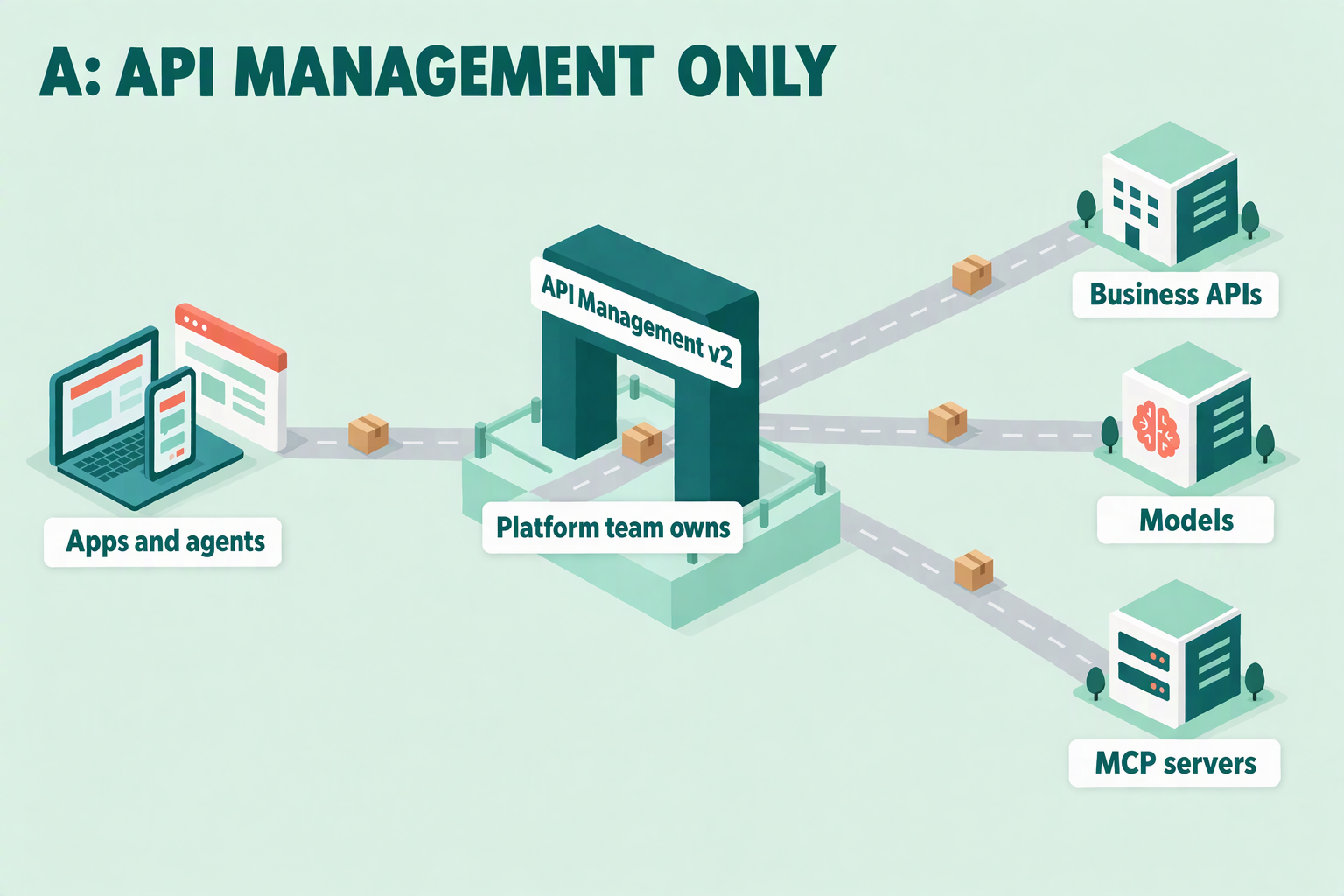
One gateway and one owner make this simple to run. It can live in New Zealand North, but the platform team also owns the queue for AI changes.
I’d pick this when AI traffic is a small share of the estate, when the gateway must run in New Zealand North, or when a workload depends on unsupported API routes, A2A, semantic caching or the Unified Model API. What you give up: the AI team doesn’t own its policy, Agent 365 stops at server-level blocks on v2, and you don’t get Agent Hooks or MCP federation.
B: Two lanes, two owners
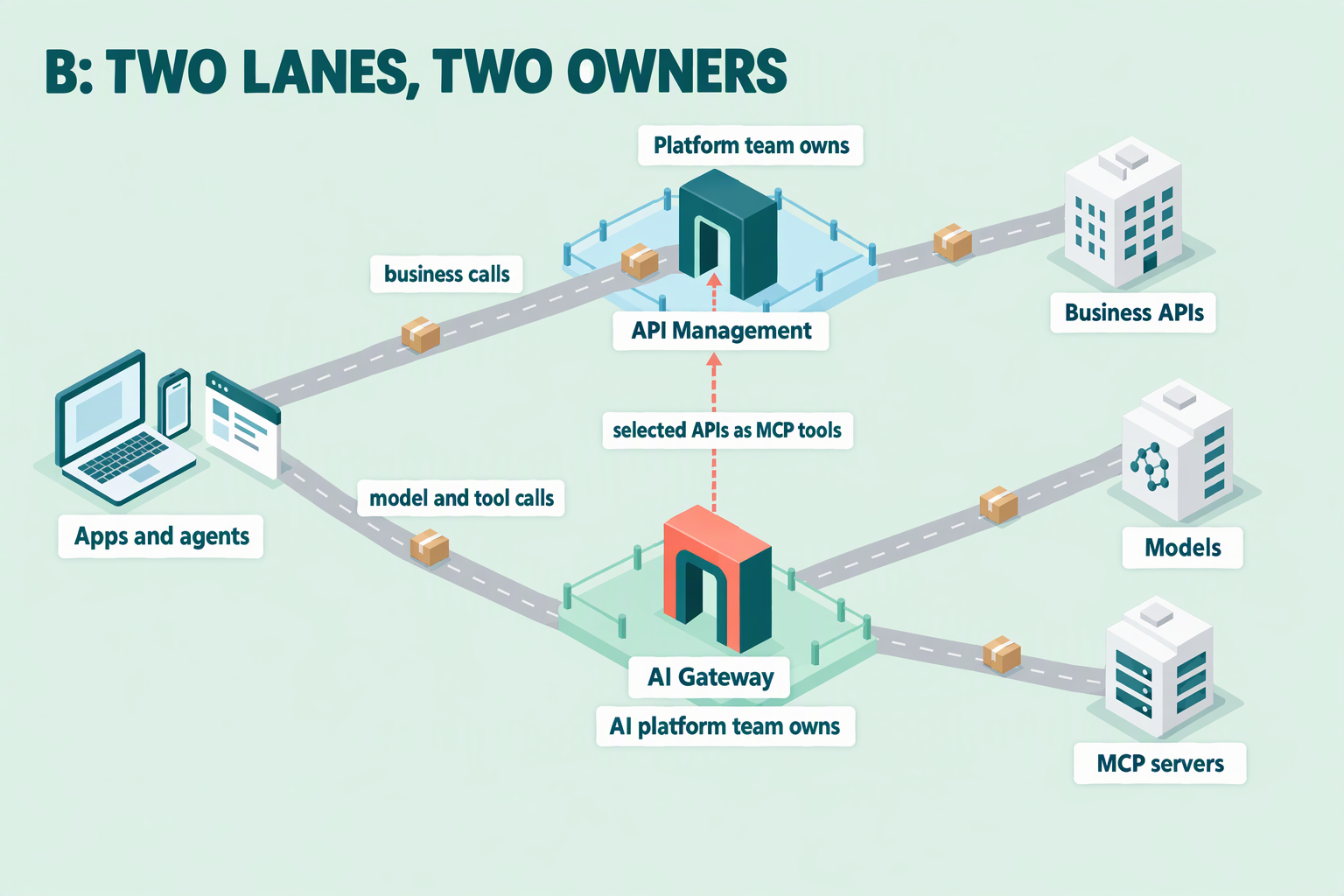
Business calls and AI calls each have one governed route. When an agent needs a business API as a tool, AI Gateway can publish it from API Management as an MCP tool. Test that the call goes through the API Management gateway so its policies still apply, and check which identity API Management sees. That depends on the backend authentication you configure, including whether the tool uses the caller’s delegated identity.
This is the shape I recommend for most organisations, and it matches Microsoft’s positioning: keep business APIs in API Management, and send model and tool traffic through AI Gateway. The platform team keeps the estate it knows. The AI platform team owns aliases, routing, limits and tools, and can move at the speed models change. The price is a second gateway to run, a second set of logs, and a clear rule about which lane a new workload uses.
One rule makes the lanes hold: prevent direct calls to model deployments and MCP servers. For app-only backends, authorise only the gateway’s managed identity and turn off alternative credentials where supported. For delegated tools, keep the user’s identity but restrict the network path so a caller can’t reach the backend directly. Azure Policy can enforce settings such as turning off key access on Foundry resources, but it won’t route traffic through a gateway on its own.
C: API Management in front of AI Gateway
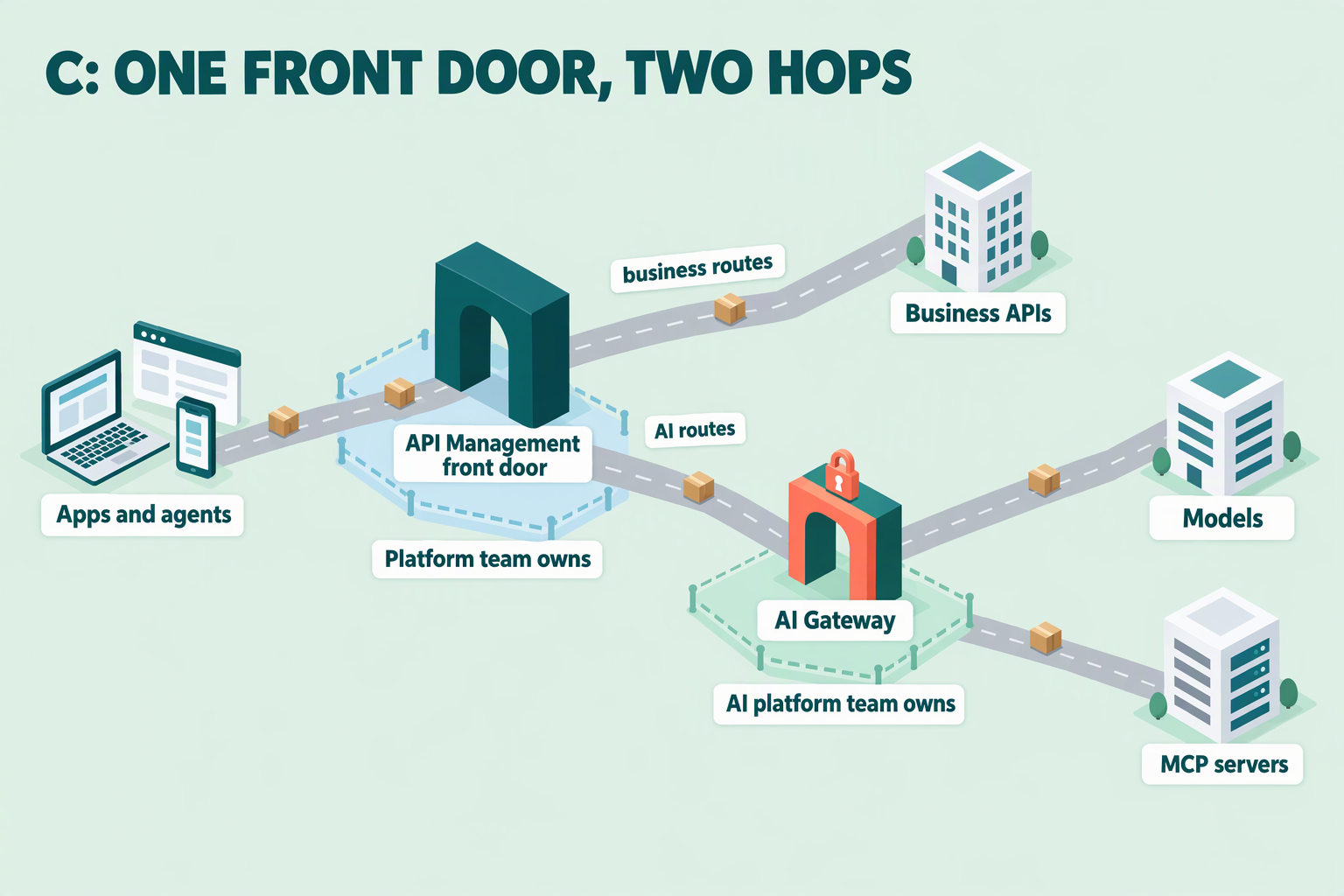
Use two hops when policy says every inbound call enters through the enterprise front door. Keep each policy in one place: the front door authenticates and correlates, and AI Gateway applies model and tool policy.
I haven’t found a Microsoft reference design for this chain, although Microsoft’s migration guidance does mention keeping a translating layer in front of AI Gateway, which is one documented reason to chain them. Treat it as your own pattern and test it. Settle five things before you build it.
- Decide which identity AI Gateway sees. If API Management uses one managed identity for all callers, AI Gateway can’t use that identity to distinguish them. User delegation and tool threat protection require a delegated token. Where you need those features, have the front door validate and forward the caller’s token for AI Gateway. Verify the supported audience for your gateway and client before configuring validation; product guides and older lab examples might differ.
- Block direct access. A valid forwarded token is also valid if it arrives on a direct path. Don’t assume the API Management v2 gateway has a fixed outbound IP to allow. For a private path, let the front door reach an AI Gateway private endpoint through outbound VNet integration, and disable AI Gateway’s public access. Private Link is in preview for AI Gateway.
- Use trusted headers. If AI Gateway routes on a header set by the front door, overwrite whatever value the caller supplied.
- Put each policy in one place. Token limits in both gateways mean two places to debug and two numbers to explain.
- Test MCP through the chain. API Management can proxy an MCP server, but every tool call then crosses two policy engines. Keep tool policy in AI Gateway.
What about the AI Gateway Landing Zone?
The similar names don’t help. Microsoft’s AI Gateway Landing Zone is the API Management accelerator that started as AI Hub Gateway and now ships as Citadel Governance Hub. If you’ve built on it, it maps to topology A or C. The standalone service is a new option rather than a requirement to replace it.
Region and residency from New Zealand
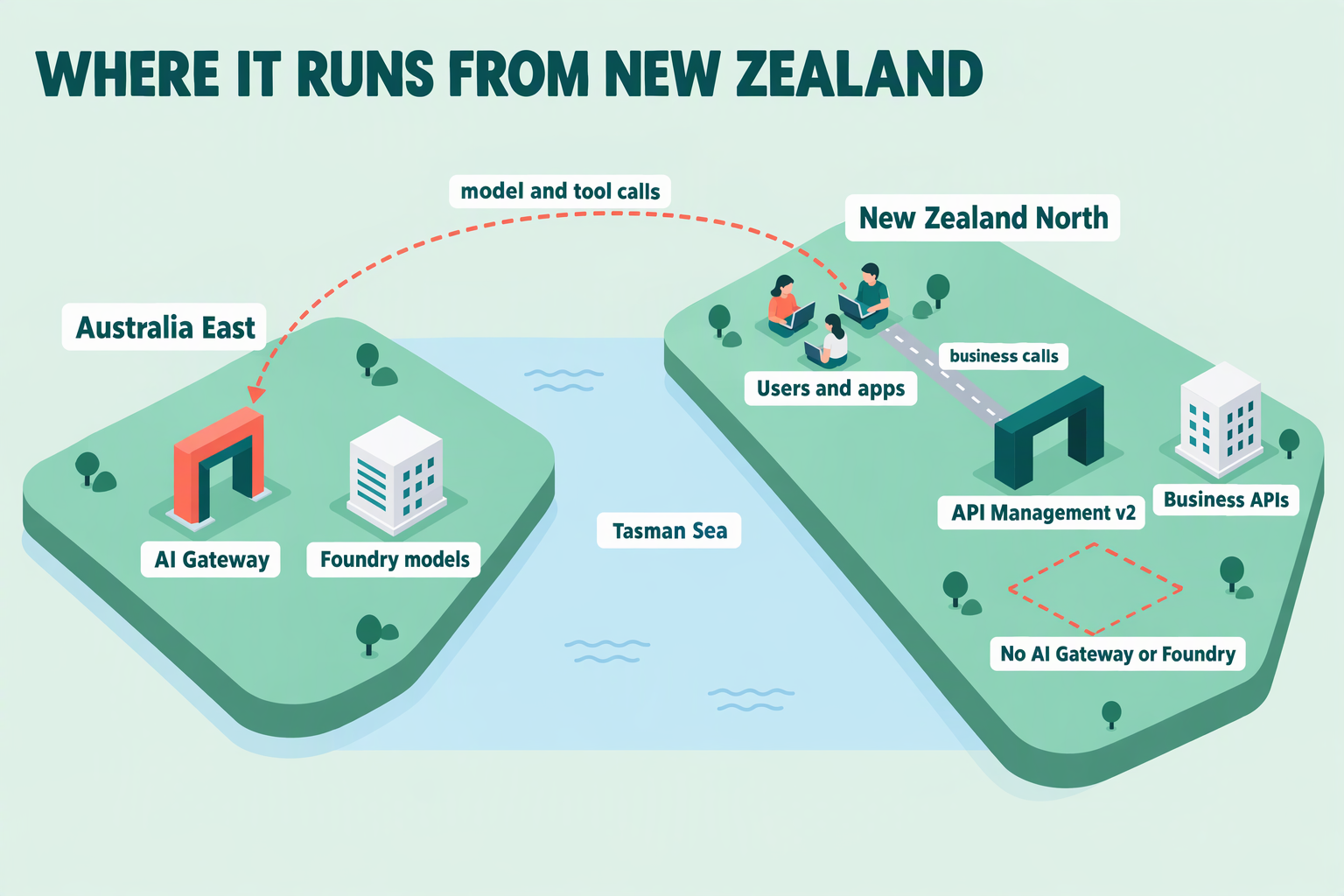
In this design the prompt crosses the Tasman either way. Putting API Management in New Zealand North doesn’t keep a call to a Foundry deployment in Australia East onshore. The region you create a gateway in, where inference runs and where telemetry lands are separate decisions.
For a New Zealand organisation, three facts shape this.
- Model inference: New Zealand North isn’t listed for the Foundry model deployments in this comparison. For Foundry serverless model deployments, Global can process in any Azure region, Data Zone stays inside the selected US, EU or Asia Pacific zone, and Standard or Regional Provisioned stays within the deployment’s Azure geography. A region for a gateway isn’t a guarantee about model inference.
- Gateway payloads: I couldn’t find a statement covering request processing and storage beyond the gateway’s chosen region. Leave payload capture off for regulated prompts until you’ve confirmed residency and what gets captured or redacted.
- Telemetry: AI Gateway sends OpenTelemetry signals to the endpoint you configure. In Microsoft’s monitoring lab, logs and traces land in the linked Log Analytics workspace, while metrics land in an Azure Monitor workspace. For onshore telemetry, verify regional support for OTLP ingestion and the location of each workspace, not just the Application Insights resource.
If you already use the pattern from my Foundry cross-region post, with data at rest in New Zealand North and inference in Australia East over private endpoints, AI Gateway fits the same shape. Its inbound private endpoint can sit in your New Zealand North virtual network even though the gateway runs in Australia East, while outbound VNet integration needs a dedicated subnet in the gateway’s own region and subscription. Both are in public preview.
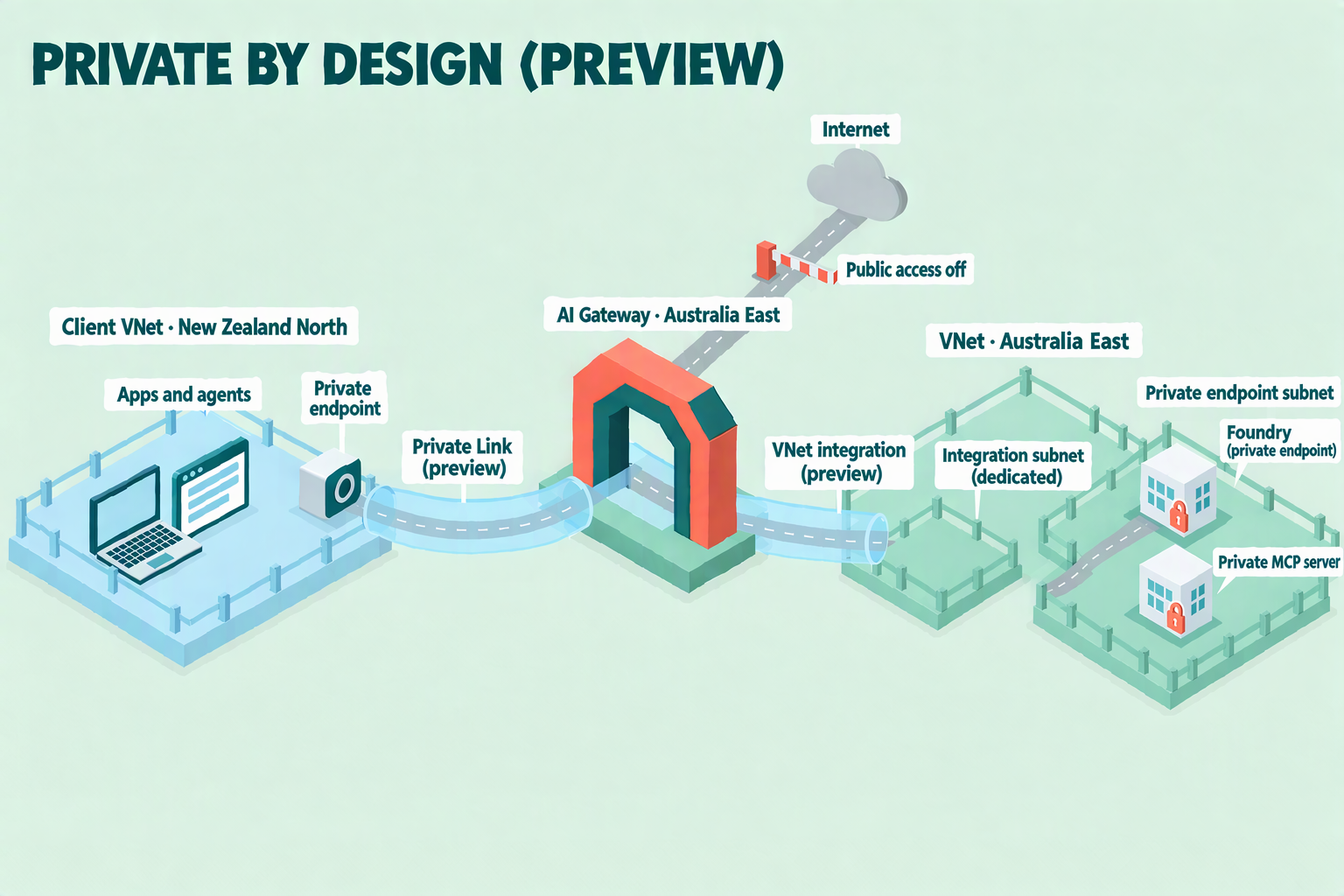
Plan a dedicated integration subnet in the gateway’s region and subscription. Microsoft’s lab demonstrates changing private routing on an existing gateway, while Learn’s migration page says you can’t change the virtual network or subnet after creation. Don’t make the design depend on changing it later. Verify the private connection and DNS from the New Zealand client network as well as from the gateway to the backends.
Workspaces won’t carry MCP
The tempting compromise is to give the AI platform team a workspace in the enterprise API Management instance: their own APIs, products and policies, while the platform team keeps the service. Workspaces are good at that, but read what they don’t support before you promise it.
- MCP servers aren’t supported in workspaces.
- There’s no self-hosted gateway or credential manager, and Defender for APIs doesn’t cover workspace APIs.
- Workspaces get the internal cache only, and semantic caching needs an external one.
- Request metrics can’t be split by workspace in Azure Monitor.
- Dedicated workspace gateways have no inbound private endpoints or custom hostnames. Gateways created after 15 April 2025 can host up to 30 workspaces by default; support can raise the limit. Dedicated capacity costs extra. It isn’t offered in New Zealand North, and Australia East shows new workspace gateways as temporarily unavailable.
In the v2 tiers a workspace can use the instance’s managed gateway instead of a dedicated workspace gateway, which helps with cost but not with MCP.
Who owns what
Two gateways only work with one owner per decision. This is the split I’d start with.
flowchart TB
    accTitle: Ownership zones for two gateways
    accDescr: The platform team owns the API Management front door, business APIs, WAF, DNS and certificates. The AI platform team owns AI Gateway, including aliases, routing, limits, MCP federation and tool allow lists. Security owns Entra ID, Conditional Access and Agent 365 blocks, and its blocks override the gateway. Application teams own their agents and request runtime roles on the aliases and MCP servers they need.
    subgraph APP["Application teams"]
      X1["Agents and apps
request roles per alias or MCP server"]:::app
    end
    subgraph PL["Platform team"]
      P1["API Management front door
business APIs, WAF, DNS, certificates"]:::apim
    end
    subgraph AIT["AI platform team"]
      A1["AI Gateway
aliases, routing, limits,
MCP federation, tool allow lists"]:::aig
    end
    subgraph SEC["Security"]
      S1["Entra ID, Conditional Access,
Agent 365 blocks"]:::sec
    end
    X1 -- "business calls" --> P1
    X1 -- "model and tool calls" --> A1
    S1 -. "a block overrides" .-> A1
    classDef app fill:#f1f5f9,stroke:#334155,color:#000
    classDef apim fill:#cce5ff,stroke:#1f6feb,color:#000
    classDef aig fill:#e6ffed,stroke:#2da44e,color:#000
    classDef sec fill:#ede9fe,stroke:#6d28d9,color:#000
The platform team owns the front door, the AI platform team owns model and tool policy, security can override with a block, and application teams ask for the access they need.
- Platform team: decides which business APIs to publish and to whom. API Management products and subscriptions enforce that decision.
- AI platform team: owns aliases, routing, failover and consumption limits. It agrees the exposed toolset with security and enforces it in AI Gateway.
- Security: owns emergency blocks of servers and tools via Agent 365 on supported gateways.
- Application teams request access; the AI platform team approves and assigns scoped runtime roles to aliases or MCP servers.
- Foundry owners: own model deployments and their quotas.
A few details make this split work in practice.
- Use runtime roles, not shared keys. The broad scope is the default workspace, labelled All assets in the portal. AI Gateway Models User can also be scoped to a model alias, and AI Gateway Tools User to an MCP server. AI Gateway User covers both. Give application teams the narrower grants so they can’t reach a model outside their alias and miss the alias limits.
- Set a policy floor at the gateway and tighter limits at narrower scopes. Foundry quota still applies at the backend. Registering a deployment doesn’t change who owns it.
- Agree that a security block wins. Agent 365 integration requires tenant consent for the A365 MCP Gateway Policy Operator role. The integration can discover resources in existing and future subscriptions and write scoped policies. Server blocks return HTTP 403. Tool blocks require a static list of exposed tools and return HTTP 200 with
isError: true, so alert on tool errors rather than HTTP status alone. Point agents at the gateway explicitly and make sure infrastructure deployments don’t remove Agent 365’s managed policies. - Keep policies in infrastructure as code. Audit or deny changes with Azure Policy where it supports the relevant resource properties. Treat estimated cost limits as guardrails, not exact budgets: a limit can return
LlmCostQuotaExceeded, and concurrent activity can overshoot briefly. Reconcile estimates from public prices with actual billing.
Correlation IDs across both gateways
I use the same rule for every gateway: honour the caller’s correlation ID end to end into Log Analytics, and if there isn’t one, create it and return it. With two gateways, you need a second ID as well.
sequenceDiagram
    accTitle: A correlation ID and a W3C trace across both gateways
    accDescr: The caller sends x-correlation-id. API Management keeps it if it's valid or creates one, and sends it on to AI Gateway with a W3C traceparent. AI Gateway calls the model. API Management returns the correlation ID to the caller. Both gateways send their records to the same Log Analytics workspace.
    autonumber
    participant C as Caller
    participant A as API Management
    participant G as AI Gateway
    participant M as Model
    participant L as Log Analytics
    C->>A: Request with x-correlation-id
    A->>A: Keep a valid ID, otherwise create one
    A->>G: Forward with x-correlation-id and traceparent
    G->>M: Inference call
    M-->>G: Response
    G-->>A: Response
    A-->>C: Response with x-correlation-id
    A->>L: Gateway logs, LLM logs, request telemetry
    G->>L: OTelSpans and OTelLogs
The correlation ID ties the call to the caller’s logs. W3C Trace Context lets you follow the same request across services. Microsoft’s lab says AI Gateway continues an incoming trace; confirm that API Management sends it and that you can find it in telemetry before relying on a join.
At the front door, keep a valid caller ID, otherwise create one, and send it back on the response. This sketch checks the format so a caller can’t push arbitrary text into your logs:
1 | <policies> |
The on-error section means calls that fail with a policy error carry the ID too (a return-response in a parent scope still skips it), and the choose block keeps AI Gateway’s own ID when it sends one, which it does on some responses such as Agent 365 blocks, so the two can still be matched. In Bicep or ARM templates, match the format to the policy text: use xml for the escaped example above and rawxml for policy text with unescaped expressions. Then:
- Set the HTTP correlation protocol for API Management’s Application Insights diagnostic to
W3Cso it sends Trace Context to the backend. - Configure OTLP ingestion and the appropriate signal endpoints; a connection string alone isn’t enough. Microsoft’s monitoring lab documents the Monitoring Metrics Publisher grant on the data collection rule and shows
OTelSpansandOTelLogsin Log Analytics. - Query both gateways’ telemetry in the same Log Analytics workspace where your residency rules permit it. API Management’s
ApiManagementGatewayLlmLogshares aCorrelationIdwithApiManagementGatewayLogsfor its own request and token records. That’s distinct from your application header. - Send a test request with a known
traceparentandx-correlation-id. Confirm the trace ID inOTelSpansmatches the Application Insights operation ID before joining on it. Don’t assume AI Gateway records your custom header. If it doesn’t, log the gateway’s returned ID alongside your own when present, or retain an explicit mapping in trusted telemetry.
A correlation ID is a label, not proof of who called. Don’t use it for authorisation.
If you built on the preview tier
A pilot on the old AI Gateway tier keeps working until 15 January 2027, and then it’s removed. There’s no in-place conversion.
- Create a gateway of the new resource type, and move templates to
Microsoft.ApiManagement/aigatewayswith API version 2026-11-01. - Re-create model providers, models, aliases, MCP servers, policies, monitoring and keys. Role assignments don’t carry over, and a new system-assigned identity has a new principal ID, so re-grant its access to your backends.
- Update callers: the new runtime URL, a new key or Entra identity, and an
Authorization: Bearerheader in place ofapi-key. - Check the gaps that matter to you on the migration page. Private endpoints need preview approval. The page says the content safety policy isn’t supported and suggests Foundry guardrails instead, while the GA announcement, the product docs and Microsoft’s labs show a content safety policy on the new type, so test it on your own gateway and keep Foundry’s guardrails on either way. And it says you can’t change the virtual network or subnet after creation. The product’s release notes say you now can, but the product docs also list an
AIGatewaySubnetImmutableerror for gateways where that isn’t enabled yet, so plan as if the migration page is right.
If you’re also moving AI APIs off a regular API Management instance, Microsoft publishes a coding-agent plugin that inventories the instance, plans the equivalent AI Gateway and provisions it. It’s designed to add resources rather than remove anything from API Management, so it’s a reasonable way to get a first draft of that move. Review its plan before you let it provision.
My take
GA changes the default. For new model and tool traffic, I’d start on AI Gateway in Australia East unless one of the three questions sends the workload to API Management. API Management stays the front door for business APIs, and nobody needs to rip out AI workloads that already run well there.
Two lanes beat a chain. Topology C looks tidy on a slide, but every AI call adds a second gateway hop to operate and observe, and needs an identity design you have to get right on purpose. Check the cost of each gateway separately against its tier and request allowance. I’d only chain the gateways when a security standard requires one front door for everything, and I’d write down which policy lives where before the first API goes live.
Ownership is the real decision. The AI platform team should own model and tool policy outright, with security holding a block it can apply at any time through Agent 365. A workspace in someone else’s API Management is a reasonable home for AI APIs, but not for MCP or semantic caching.
The gaps are real. Private networking is there but still in preview, and so are Agent Hooks, Model Router and tool threat protection. Content safety, the free allowance and the Agent 365 integration each have two answers depending on which page you read. AI Gateway isn’t offered in New Zealand North, and I couldn’t find a published statement on where it processes or stores request data beyond the region you create it in. None of that needs to stop a production pilot. It should stop anyone promising what the platform doesn’t do yet.
My first week would look like this: re-create any preview-tier gateways, then stand up one AI Gateway in Australia East with Entra access and no runtime keys, one alias, one MCP server and tracing into the same workspace as the front door. Use it to test the ownership split with real traffic.
Key takeaways
- Put business APIs on API Management and model and tool traffic on AI Gateway by default. Give each path one owner.
- Keep workloads on API Management when the gateway must be in New Zealand North or needs unsupported inference routes, A2A, semantic caching or format translation. AI Gateway private networking is still in preview.
- Replace old preview-tier gateways before 15 January 2027 and grant runtime roles again at the narrowest scope.
- If you chain gateways, verify which identity and trace survive both hops. Confirm the deployment type, not the gateway address, before promising where inference runs.
References
- Microsoft: Azure AI Gateway GA announcement and API Management at Ignite 2026
- Microsoft Learn: Compare AI Gateway and API Management and migrate from the preview tier
- Microsoft Learn: API Management regional availability and workspace constraints
- Microsoft Learn: Foundry model deployment types and model region availability
- Microsoft Learn: Agent 365 governance on AI Gateway and API Management policy expressions
- Azure AI Gateway Labs: Private networking and monitoring and traces
Related posts
- MCP Goes Stateless: No Handshake, No Sticky Sessions, Better AI Gateways: per-tool routing at the gateway, and the preview-era AI Gateway notes this post brings up to date.
- AI Agents Exploit Leaked Keys in Minutes: Go Keyless on Azure: why Entra roles beat gateway keys.
- Microsoft Foundry Cross-Region with Private Endpoints (Part 1): data at rest in New Zealand North, inference in Australia East.
- Copilot Studio Bring Your Own Model: Microsoft Foundry Governance and Security: another case of two control planes with two owners.
- APIM Backend Fan-out: Shared Backend + rewrite-uri vs One Backend Per API (A Real Benchmark): API Management backend design, measured rather than assumed.
Image Credits
- Cover image generated by Copilot
Azure AI Gateway Is GA: When to Use It, When to Keep APIM, and Who Should Own It