AGENTS.md vs Copilot Instructions vs Cursor Rules vs CLAUDE.md: Which AI Context File to Use, and When (2026)
TL;DR
AGENTS.mdis the portable format for project instructions. Most major coding agents read it; Gemini CLI needs a setting.- Copilot also has its own instructions, rules for matching paths, custom agents and skills.
.github/copilot-instructions.mdreaches the most Copilot surfaces.- Within an
AGENTS.mdhierarchy, the nearest applicable file specialises its parents. Your explicit chat instructions take priority for the task.- Context files change agent behaviour. The research does not show that they reliably improve correctness, speed or cost.
Keep one lean source of verified project rules:
AGENTS.mdwhen several tools share the repo, orcopilot-instructions.mdfor a Copilot team. Treat it as an operating guide, not a performance switch.
In a hurry? Jump to the quick comparison, then come back for precedence, the research and the decision guide.
If you use an AI coding agent every day, whether that’s GitHub Copilot, Cursor, Claude Code, Codex or Gemini CLI, you’ve felt this particular flavour of tedium: you keep typing the same rules into every prompt.
“Use Vitest, not Jest. Don’t touch /legacy. Named exports only. Return { data, error } from every endpoint.”
The agent obeys for one session, you close your editor, and tomorrow you type it all again. That isn’t a prompting problem. It’s a missing context layer: the middle tier between what you ask in the moment (the prompt) and the whole system you build around the model (the harness).
That layer has a name now. Several names, actually, and that’s exactly the problem: AGENTS.md, copilot-instructions.md, .cursorrules, CLAUDE.md, GEMINI.md, Skills, custom agents. They overlap, they compete, and they keep moving. In 2026 alone, Claude Code started reading AGENTS.md, Windsurf became Devin Desktop, and Copilot’s coding agent became the cloud agent. Almost nobody explains how they fit together or which one you should actually use.
This post untangles all of it: what each file is, how they interact, what the research says about whether they even work, and, most importantly, which file to reach for, and when.
TL;DR diagram: which file should you use?
Here’s the whole decision on one page. The rest of the post explains every box in it.
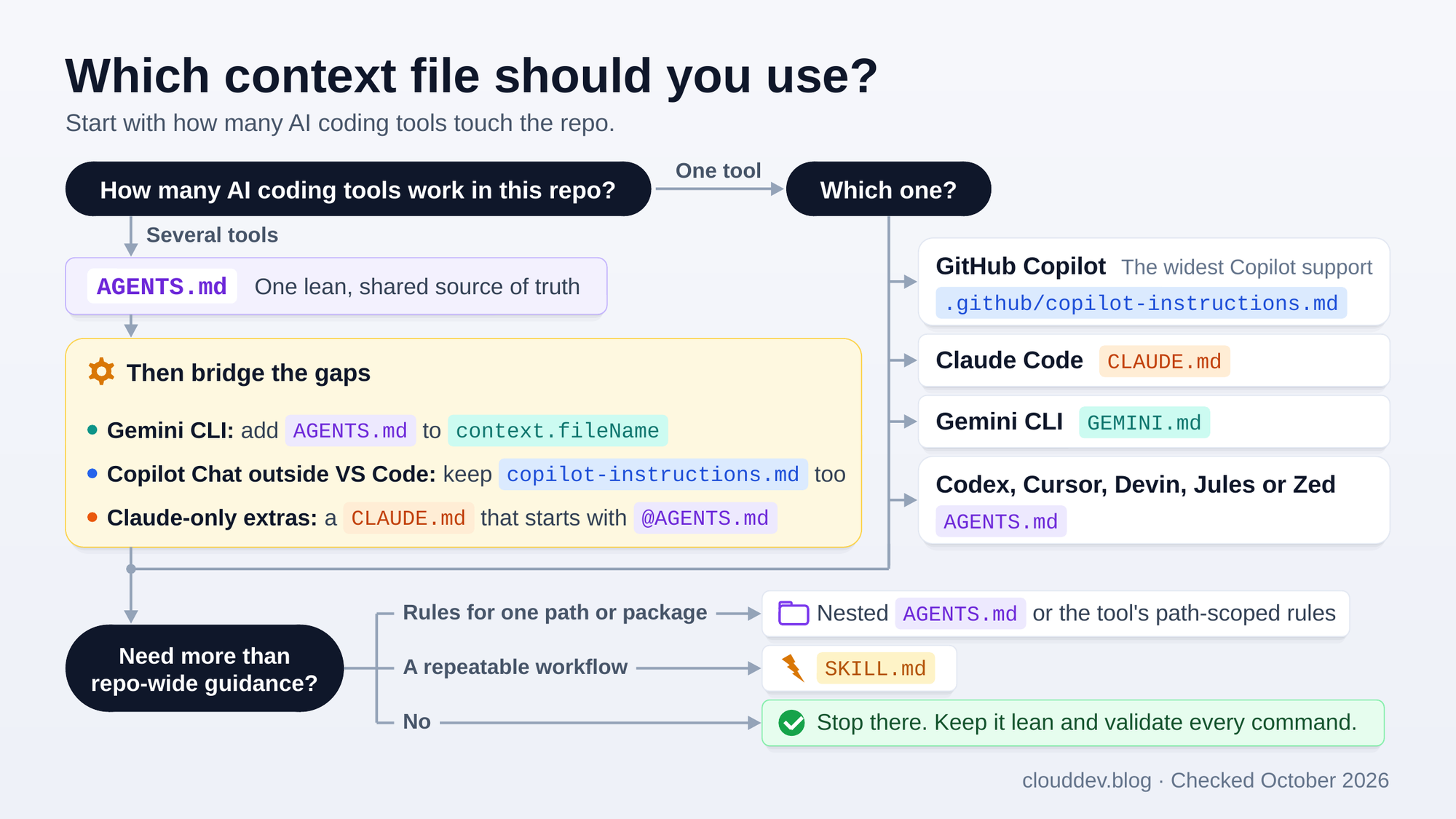
For example, Copilot in VS Code and Claude Code can share one
AGENTS.mdwhen there’s noCLAUDE.md. A Copilot team can start with.github/copilot-instructions.md. Cursor users alongside Copilot Chat in Visual Studio need both. A deploy or release procedure belongs in aSKILL.md, whichever instructions the repo uses.
First, what is an “AI context file”?
When an AI coding agent picks up a task, it first has to orient itself: it explores the file tree, opens manifests and config, and reads whatever documentation it can find. But a README is written for humans. It explains what the project does, not how an agent should work on it: which test command to run, which directories it must leave alone, or that /legacy uses synchronous code on purpose and must not be “modernised”.
An AI context file fills that gap. It’s a plain text file, usually Markdown, that hands the agent the operating manual it would otherwise have to guess at: exact build and test commands, conventions that differ from the defaults, architectural boundaries, and the files it should never touch.
The intended payoff is simple: give the agent verified commands and boundaries up front so it doesn’t have to rediscover or guess them. Sometimes that cuts exploration and corrections. Sometimes the extra instructions trigger more reading, testing and reasoning instead. That tension is exactly what the 2026 research examines, and we’ll get to it.
The naming collision nobody warns you about
Before comparing files, clear up one thing that trips up almost everyone: two completely different things are both pronounced “agents dot md”.
Project context: root AGENTS.md
This tells agents how to work in the repo or a particular subtree. It’s plain Markdown without frontmatter, and many coding tools read it. Gemini CLI needs a setting.
For example: “FastAPI, Python 3.12. Run uv run pytest. Never touch /legacy.”
A custom agent: .github/agents/*.agent.md
This defines a Copilot specialist you select when you need it. It has a YAML profile: GitHub requires a description, and name falls back to the filename.
For example, a test-agent might say: “You are a QA engineer. Write to /tests/ only.”
You pick these personas from the agents dropdown in VS Code, the agents panel on GitHub.com, or with /agent in Copilot CLI. Same words, two jobs. Even GitHub’s own “How to write a great agents.md” post is about custom agents, not the root AGENTS.md format.
Context files at a glance
The easiest way to compare these files is by what they do and when they load.
Instructions for the whole repo
AGENTS.md is the portable option. Codex, Cursor, Devin Desktop, Jules, Zed and supported Copilot surfaces read it, as do recent versions of Claude Code when there’s no CLAUDE.md. Use a root file for shared guidance and nested files for local differences. No frontmatter is required.
.github/copilot-instructions.md is Copilot’s native option. It supplies instructions across Chat, the CLI, the cloud agent and code review, with a few surface limitations covered below. It’s plain Markdown, always loaded, and has the widest Copilot support.
CLAUDE.md is Claude Code’s native option. It supports @ imports and combines the files it discovers. Personal notes belong in CLAUDE.local.md. Copilot’s CLI, cloud agent and GitHub.com code review, plus Cursor and Zed, also read a root CLAUDE.md.
GEMINI.md is Gemini CLI’s default. It combines global, workspace and parent instructions, then discovers subdirectory guidance as needed. Copilot’s CLI, cloud agent and GitHub.com code review, plus Zed, also read a root GEMINI.md. Gemini can share AGENTS.md through context.fileName.
Rules for selected files
.github/instructions/*.instructions.md targets Copilot rules at matching paths. YAML frontmatter supplies an applyTo glob; optional excludeAgent controls whether the cloud agent or code review receives the file. Support varies by Copilot surface.
.cursor/rules/*.mdc gives Cursor rules that can load always, by glob, by the agent’s choice or by an explicit mention. Its frontmatter uses description, globs and alwaysApply. Plain .md files in that folder are ignored; .cursorrules is the legacy format.
.devin/rules/*.md gives Devin Desktop rules with an activation mode: always, glob, model decision or manual. It still reads .windsurf/rules/ and .windsurfrules as fallbacks, alongside root and nested AGENTS.md files.
Specialists and workflows on demand
.github/agents/*.agent.md defines a Copilot persona, not project context. Its YAML profile describes a specialist you select for a task.
SKILL.md describes a capability or repeatable workflow. Copilot, Claude Code, Codex, Cursor and Gemini CLI support skills. The body loads when invoked or relevant, rather than in every session. A skill lives in its own folder and needs name and description in YAML frontmatter.
Most useful project guidance is the same whichever tool you use. Build commands, architecture boundaries and test conventions don’t change with the assistant. Keep that material in one source of truth, then add imports, rules or skills only where you need them.
The files, one by one
AGENTS.md: the portable standard
This is the one to start with if more than one tool touches your repo. AGENTS.md grew out of a collaboration across the AI tooling ecosystem, including OpenAI Codex, Amp, Google’s Jules, Cursor and Factory. In December 2025, OpenAI contributed it to the Linux Foundation’s new Agentic AI Foundation, alongside Anthropic’s MCP and Block’s goose, and the foundation now stewards it. Over 60,000 open source projects use it. It’s plain Markdown with no required fields: headings, bullets, commands and examples are enough.
“Supported by many agents” hides some important small print, so here’s who actually reads it today:
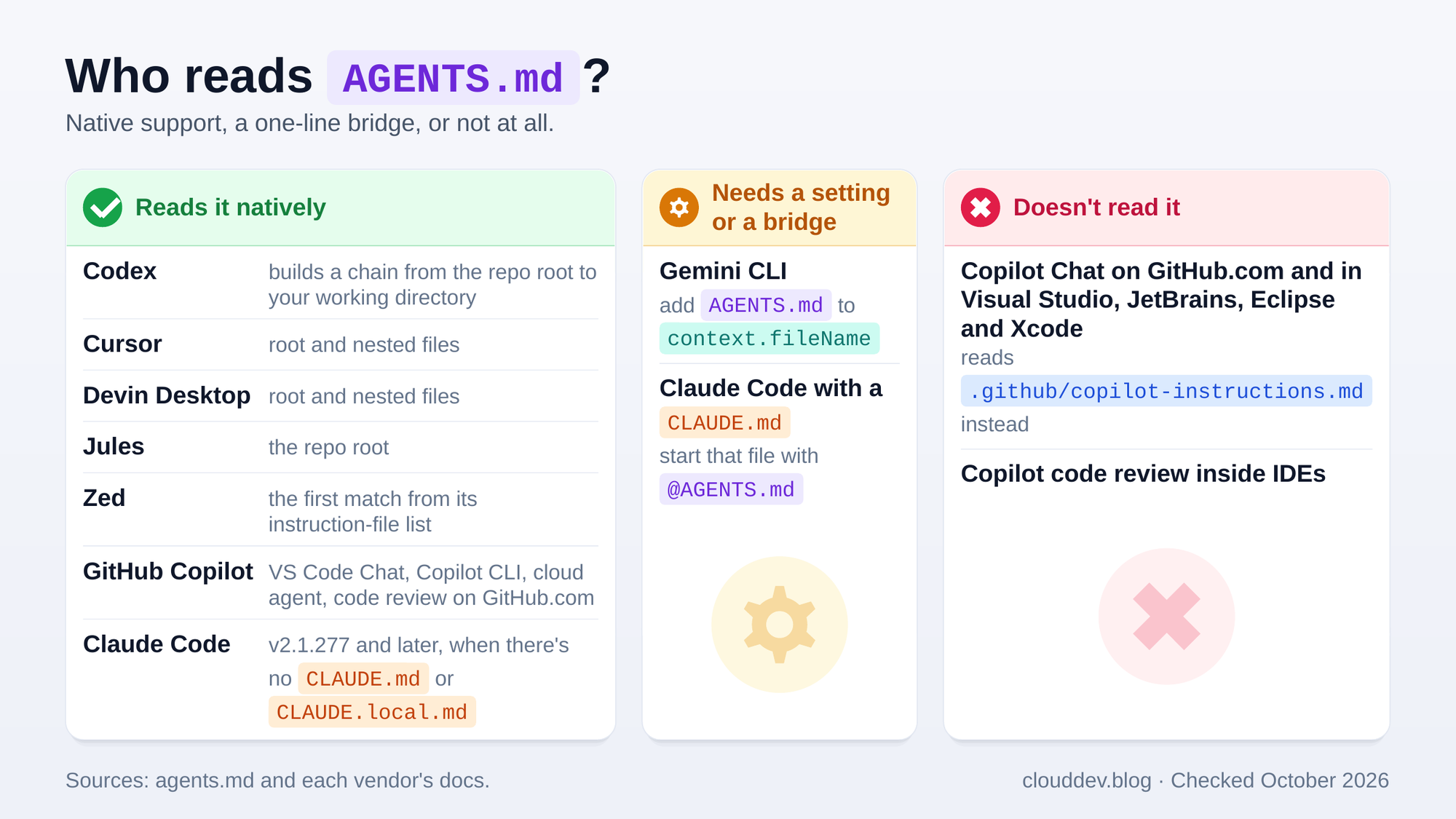
The single most useful behaviour is directory scoping. In a monorepo you can put an AGENTS.md in each package so local guidance specialises the root guidance for that subtree; at the time agents.md was written, the main OpenAI repo had 88 of them. Each tool finds and combines nested files a little differently (the precedence section below maps it out), and Codex adds a practical ceiling: it stops adding project files once the combined size reaches project_doc_max_bytes, 32 KiB by default. One more reason to keep the chain lean.
.github/copilot-instructions.md: Copilot’s default instructions
This is GitHub Copilot’s native instructions file for the whole repository, and it reaches further than any other Copilot instruction file: Copilot Chat on GitHub.com and in every supported IDE, Copilot cloud agent (formerly the coding agent), Copilot CLI and Copilot code review all read it. The one exception is code review in Eclipse, which doesn’t support custom instructions at all.
AGENTS.md support is narrower, and the support map above shows where the gap bites: as of October 2026, Copilot Chat on GitHub.com and in Visual Studio, JetBrains, Eclipse and Xcode doesn’t read it. If your team lives in Visual Studio or a JetBrains IDE, copilot-instructions.md is still the file that reaches Copilot Chat.
Where a surface reads both files, Copilot gets both, so don’t duplicate rules without a reason. If you genuinely need both (say, Cursor users alongside Copilot Chat in Visual Studio), keep the overlap deliberate and the two files consistent, and check GitHub’s support matrix for the surfaces your team actually uses.
.github/instructions/*.instructions.md: rules for matching paths
These files carry YAML frontmatter with an applyTo glob, so a rule only applies to files that match. It’s how you stop frontend conventions leaking into backend code. An optional excludeAgent key ("code-review" or "cloud-agent") hides a file from one of those two. Support is patchier than for the main instructions file (Copilot Chat on GitHub.com and in Eclipse ignores these files, for example), so check the support matrix before relying on them:
1 | --- |
Your main instructions file holds the shared context; *.instructions.md with applyTo targets rules at one slice of the tree.
.github/agents/*.agent.md: custom personas
These are the personas from the naming collision section: named specialists you pick from the agents dropdown in VS Code chat, the agents panel on GitHub.com, or with /agent (or the --agent flag) in Copilot CLI. A repository profile lives at .github/agents/<name>.agent.md. GitHub’s custom agent reference requires a description and lets name fall back to the filename; VS Code’s own docs treat every field as optional. Custom agents are still in public preview in JetBrains, Eclipse and Xcode.
The GitHub analysis covered in the anatomy section below recommends writing an agent’s boundaries as three explicit tiers: always do, ask first, never do. In practice that looks something like this:
- Always: run the tests before committing; write only to
src/andtests/. - Ask first: database schema changes, new dependencies and CI/CD changes.
- Never: commit secrets or API keys, edit
node_modules/, or delete a failing test to make the build pass.
The native files: CLAUDE.md, Cursor rules, GEMINI.md and Devin Desktop rules
Each major tool still ships its own native format. The practical notes that matter:
CLAUDE.mdis Claude Code’s native file. It supports@pathimports (up to four hops deep) and aCLAUDE.local.mdfor personal, uncommitted notes. Claude concatenates every file it finds rather than letting the nearest one override the rest.- Cursor reads
AGENTS.md(root and nested) and also picks up a rootCLAUDE.md. Its own project rules live in.cursor/rules/as.mdcfiles; a plain.mdfile there is ignored. Frontmatter (description,globs,alwaysApply) decides whether a rule always applies, applies to matching files, gets picked by the agent from its description, or waits for an explicit mention. The single root.cursorrulesfile is legacy. - Gemini CLI uses
GEMINI.mdby default: a global~/.gemini/GEMINI.md, files in your workspace and its parent directories, and discovery when a tool touches a subdirectory. It concatenates everything it finds.AGENTS.mdisn’t a default filename, so to share it, setcontext.fileNameinsettings.jsonto a string or an array such as["AGENTS.md", "GEMINI.md"]. - Devin Desktop (called Windsurf until June 2026) prefers rules in
.devin/rules/*.md, falls back to.windsurf/rules/*.md, and still reads a legacy root.windsurfrules. It discoversAGENTS.mdfiles across the workspace automatically: a root file is always loaded, and a subdirectory file applies only to files in that directory.
One Claude Code gotcha: since v2.1.277, it reads
AGENTS.mdon its own, but only when there’s noCLAUDE.md,.claude/CLAUDE.mdorCLAUDE.local.mdin your working directory or above it. Add one of those files and Claude stops readingAGENTS.md. StartCLAUDE.mdwith an@AGENTS.mdimport (Anthropic says this never causes a double read), or change the Project instructions setting toclaude-md-and-agents-md. Watch/inittoo: by default it pulls in Cursor rules andcopilot-instructions.md, but notAGENTS.md. Once it writes aCLAUDE.md, that file takes over unless it imports the shared instructions.
Because the core content is usually shared, the cleanest approach is one source of truth plus a small bridge only where you need it. For Claude Code, that bridge is a CLAUDE.md that imports the shared file and adds only what’s unique to Claude:
1 | @AGENTS.md |
SKILL.md: a capability, not context
SKILL.md is a different animal. AGENTS.md tells the agent about your project; a skill tells it how to perform a specific task (deploy, cut a release, run a migration). Agent Skills started at Anthropic and is now an open format, documented at agentskills.io and supported by Claude Code, GitHub Copilot, Codex, Cursor, Gemini CLI and others. Skills are directories, not loose files: Copilot looks for project skills in .github/skills/<skill-name>/SKILL.md, .claude/skills/ and .agents/skills/. Every SKILL.md needs a name and a description in its frontmatter. Skills use progressive disclosure: the agent sees only the name and description up front, loads the body when the skill is invoked or looks relevant, and pulls in supporting files only as needed.
Precedence: who wins when files disagree
For the AGENTS.md format itself, the portable rule is simple: an explicit chat instruction wins for the task, and the nearest applicable AGENTS.md specialises its parents. Here’s what that looks like when you edit one file in a monorepo:
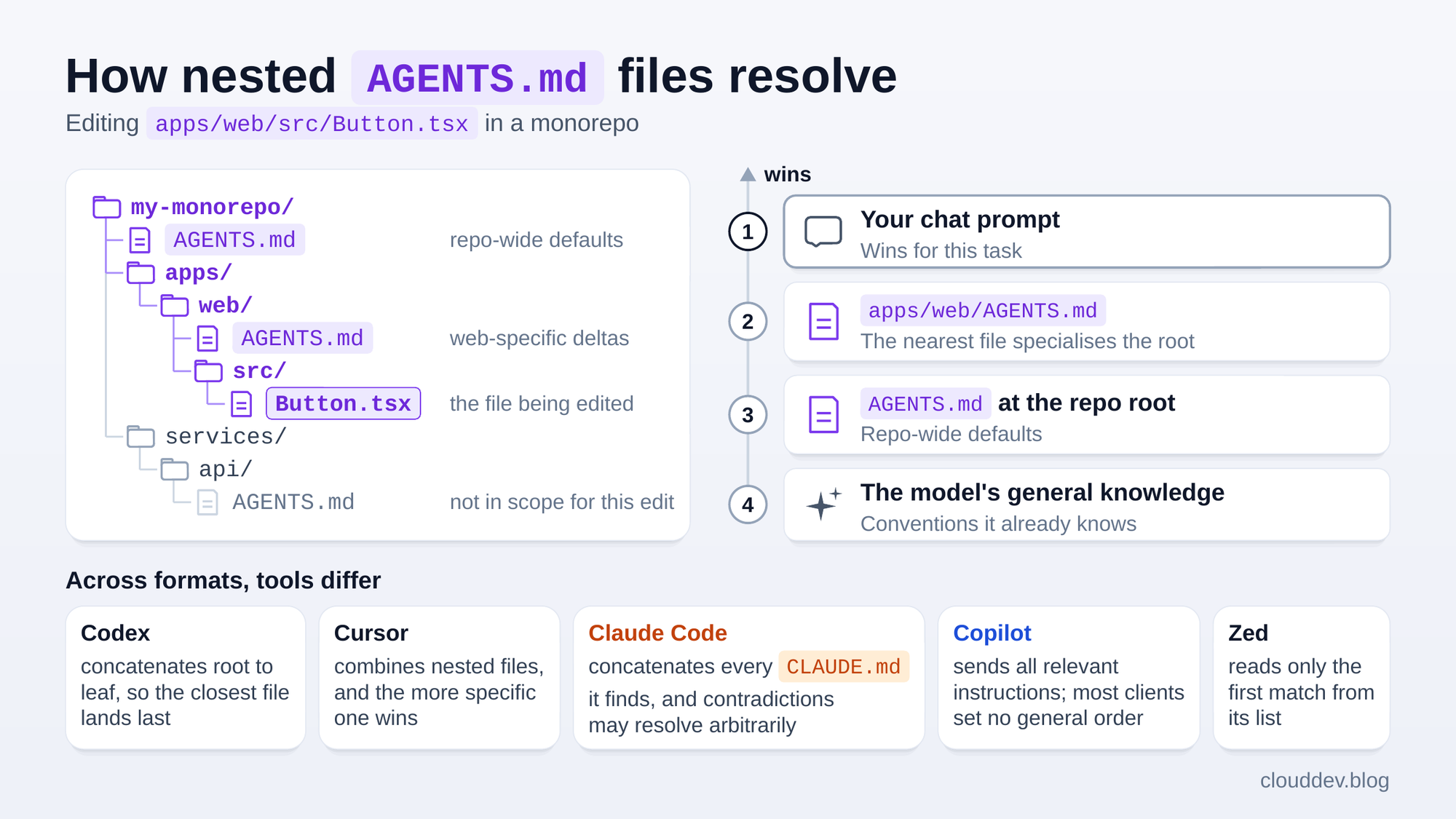
That’s the agents.md guidance, not a universal precedence model for every customisation format. Three rules of thumb hold across tools:
- Files set defaults; the human has the last word. An explicit instruction in chat overrides whatever the files say, for that task.
- Across formats, there’s no universal order. Copilot CLI does not promise a fixed order for conflicting instructions, and Claude Code may pick between contradictions arbitrarily. Zed reads only the first match from a fixed list, in which
.github/copilot-instructions.mdcomes beforeAGENTS.md. In a repo with both (and none of the files ahead of them), Zed reads only the Copilot file. - Layer, don’t duplicate. Put universal rules at the root and only the differences in nested files. A contradiction between a root file and a nested one is the easiest way to confuse an agent.
Anatomy of a great AGENTS.md
In November 2025, GitHub’s Matt Nigh analysed more than 2,500 agents.md files across public repositories. His post is written for Copilot custom agents rather than the root AGENTS.md format, and it isn’t a controlled benchmark, but its writing advice transfers well. It recommends covering six core areas:
- Commands: exact, with flags.
uv run pytest tests/ -v, not “run the tests”. - Testing: how to run the whole suite and a single test, and what (not) to mock.
- Project structure: map directories to responsibilities, and name the stack with versions.
- Code style: only the rules that differ from language defaults (the agent already knows PEP 8 and Prettier).
- Git workflow: branch naming, commit format, merge strategy.
- Boundaries: what to never touch. “Never commit secrets” was the most common helpful constraint in the analysis.
Beyond the six areas, three habits stood out: put commands early, show a real code snippet instead of paragraphs describing your style, and be specific about the stack (React 18 with TypeScript, Vite and Tailwind, rather than “a React project”).
Here’s a minimal example you can copy into a project. At about 30 lines including headings, it sits at the top of the range I’d start with:
1 | # Invoice API |
Start at 20 to 30 lines covering only what the agent gets wrong, then grow the file from real mistakes, not hypothetical ones. Cursor’s docs give the same advice: add a rule only when you see the agent make the same mistake repeatedly.
What to leave out (this part matters more than you’d think)
Every line you add competes for the agent’s attention, so redundancy isn’t free.
Include information the agent can’t infer:
- Exact build, test and lint commands, with flags.
- Rules that differ from language defaults.
- Architecture constraints and boundaries.
- Project gotchas and warnings about files it must not touch.
Leave out information it can already recover:
- Every script in
package.jsonor theMakefile. - Conventions the linter enforces, such as PEP 8 or Prettier.
- Full API documentation; link to it instead.
- Generic advice such as “write clean code”.
- Directory tours and project history.
The tool vendors agree. Claude Code’s /doctor checkup proposes cutting directory layouts, dependency lists and architecture overviews from CLAUDE.md while keeping pitfalls, rationale and conventions that differ from the defaults. Cursor’s docs tell you not to copy whole style guides into rules or document every possible command.
If that sounds like it contradicts the project structure advice above, it doesn’t. A structure section earns its place when it encodes rules (handlers stay thin, data access goes through repositories), not when it narrates the tree. As the next section shows, plain repository overviews didn’t help agents find the right files any faster.
But do these files actually work? The 2026 research
Here’s where most explainers stop and simply assert “yes, use them”. The honest answer is more interesting, because two 2026 studies reached conclusions that seem to point in opposite directions.
Study A: faster Codex runs
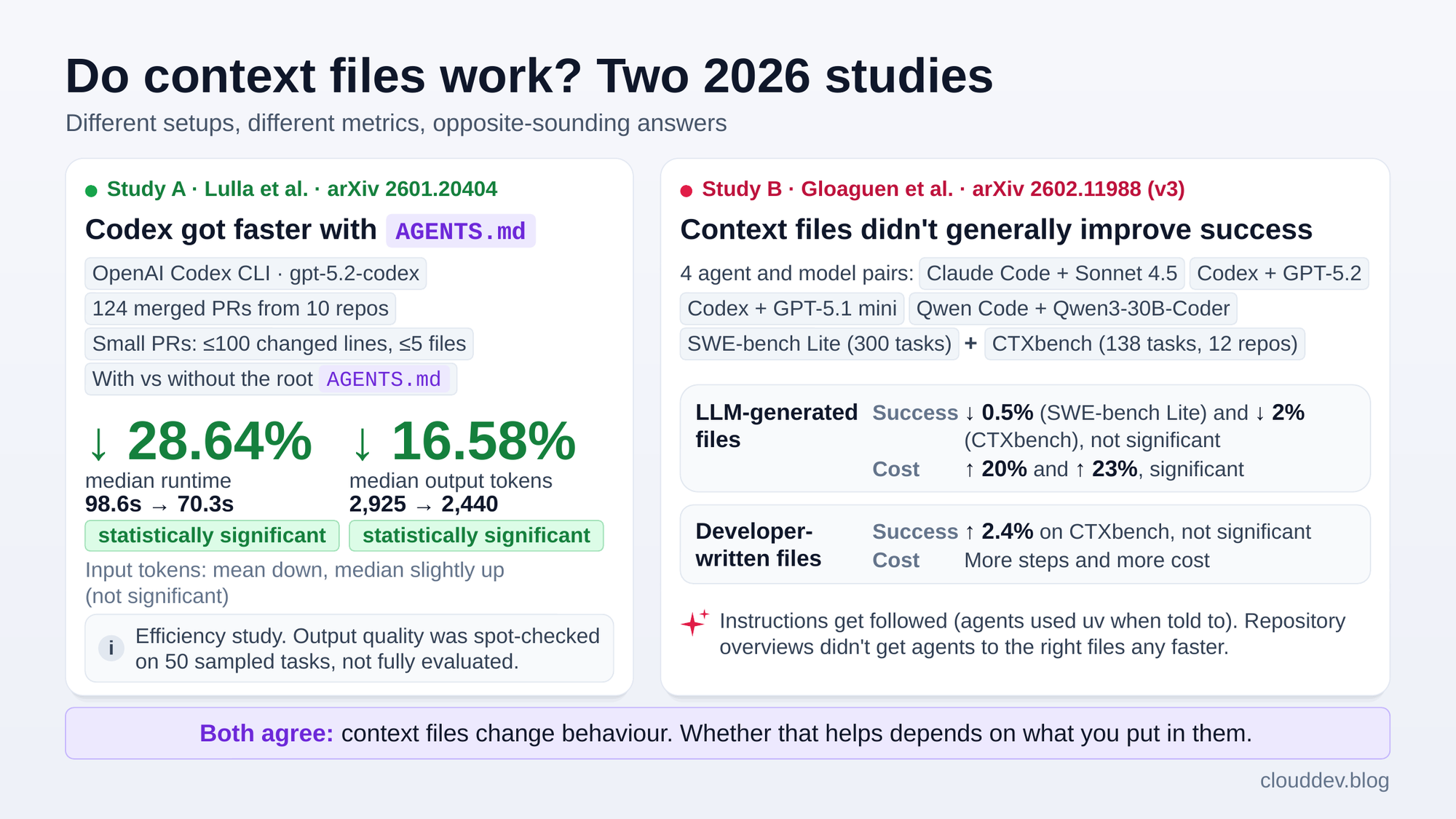
Lulla et al. ran OpenAI’s Codex CLI with gpt-5.2-codex on 124 merged pull requests from 10 repositories, under two conditions: with the repository’s root AGENTS.md, and with it removed.
Median runtime fell 28.64% (98.6s → 70.3s) and median output tokens fell 16.58% (2,925 → 2,440). Both differences were statistically significant. Input tokens told a muddier story: the mean fell but the median rose slightly, and neither change was significant.
This was an efficiency study, not a correctness benchmark. The authors put a full evaluation of output quality out of scope, and instead inspected the agent’s output for 50 randomly sampled tasks against the merged human PRs. It also covered one agent and one model, and only small PRs (100 changed lines or fewer, across five files or fewer).
Study B: more cost without a reliable success gain
Gloaguen et al. from ETH Zurich and LogicStar.ai tested four agent and model combinations: Claude Code with Sonnet 4.5, Codex with GPT-5.2 and with GPT-5.1 mini, and Qwen Code with Qwen3-30B-Coder. They used SWE-bench Lite and CTXbench, a benchmark of 138 tasks built from 12 repositories whose developers had committed their own context files.
Files generated by an LLM lowered average resolution rates slightly (by 0.5% on SWE-bench Lite and 2% on CTXbench, neither statistically significant) while raising inference cost by 20% and 23% respectively. Files written by developers did better, improving success by 2.4% on average on CTXbench (for every agent except Claude Code), but that gain wasn’t statistically significant either. They still added steps and cost.
The agents did follow instructions: when a file mentioned uv, for example, they used it far more often. What didn’t help was the repository overview. Context files didn’t get agents to the files that needed changing any faster.
Side by side, the two studies look like this:
A note on versions: I’m quoting version 3 of Study B, from September 2026. Earlier versions called the benchmark AGENTbench and reported a 4% gain for files written by developers, so you may see that figure quoted elsewhere.
The studies don’t prove that lean files always win. Together they show that context files change agent behaviour, and that the outcome depends on the file, the task, the agent and the metric. Specific instructions get followed; overviews and generated boilerplate mostly add exploration and cost.
Study B’s authors land in a similar place: context files are useful for spelling out unusual practices, and any attempt to boost performance with them should be rigorously evaluated. My synthesis is a testable hypothesis: keep commands, constraints and pitfalls the agent cannot infer; cut the narration it can recover from the repository; then check the result in your own workflow.
So, do they work?
There are two different questions here, and keeping them separate prevents most of the confusion:
Can context files change agent behaviour? Yes. Agents generally follow the concrete commands, boundaries, tools and conventions they’re given.
Do they reliably make agents more correct, faster or cheaper? Not reliably. Published results are mixed and vary by model, task, file content and what you measure.
My practical recommendation is still to start with one lean context file of verified rules the agent cannot infer. That’s a maintainability and risk management call, not a performance claim: it gives the team one portable place for commands and boundaries while keeping the default context small.
Use lean instructions when you have real project knowledge worth preserving. Don’t assume they improve every task. Test the outcome.
What this means for your Copilot bill
On June 1, 2026, GitHub moved every Copilot plan from premium requests to billing based on usage in GitHub AI Credits. One credit is $0.01 USD, and each interaction is charged at the model’s published rates for input, output and cached tokens (plus cache writes, for models that price them). The exception is annual Copilot Pro and Pro+ subscribers who stayed on premium requests: they keep them, at higher multipliers since June 1, until their annual plan ends. Check which billing model your account shows before comparing numbers.
That shift is why context files now matter for cost. Under premium requests, you paid per prompt (or per cloud agent session), and the tool calls an agent made on its own were free. Under AI Credits, agent mode and the cloud agent can make several model calls within a single task, and every one is metered. Running a shell command isn’t billed by itself, but the tool definitions, the output fed back to the model and each subsequent call are all tokens. Your default instructions ride along each time:
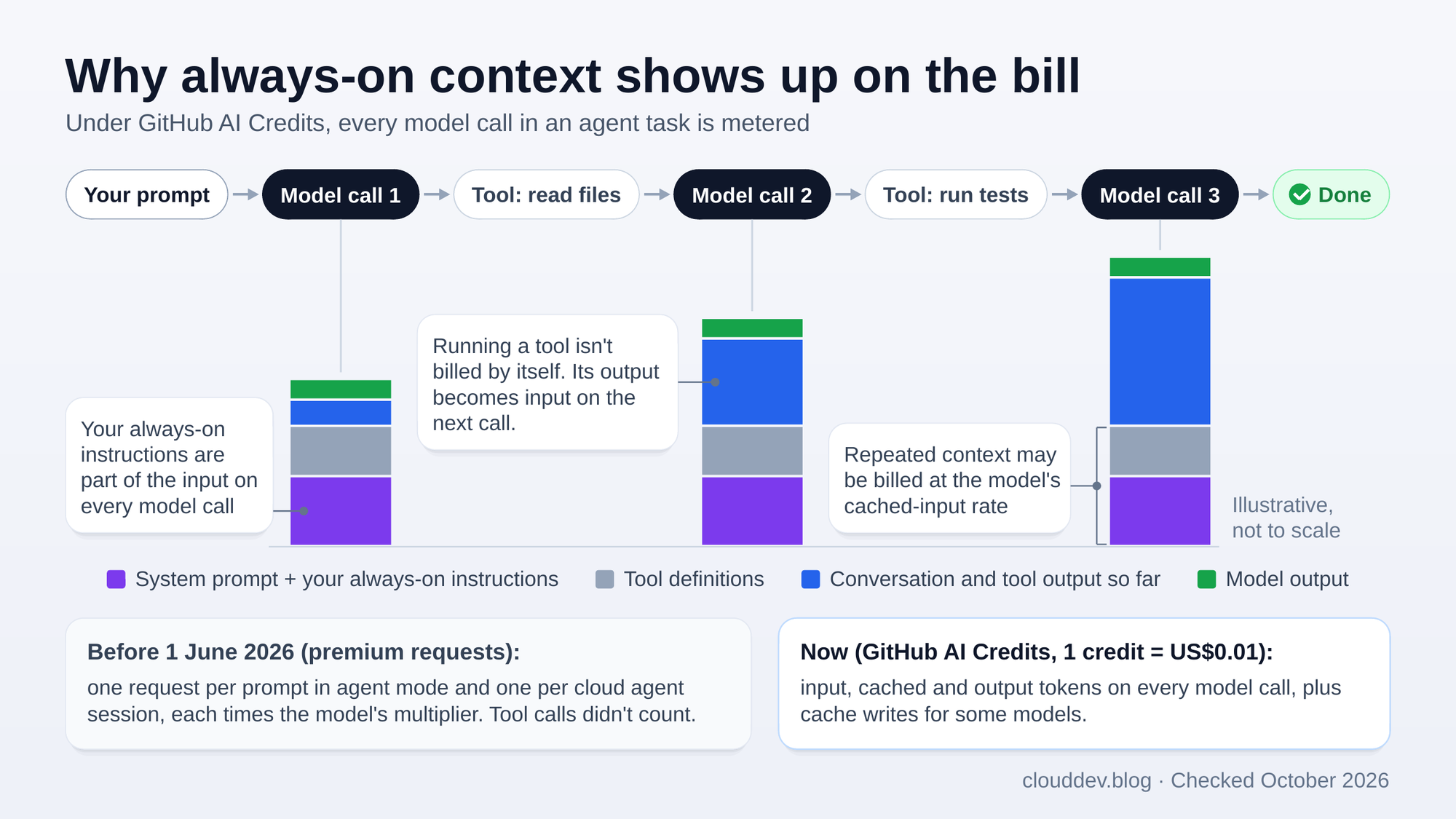
GitHub’s own docs make the link explicit for code review: consumption “generally increases with pull request size and repository custom instructions”. That gives a good context file four possible cost levers:
- Fewer corrections. Every “no, use Vitest… no, don’t touch legacy…” extends the conversation and triggers more model calls.
- Less exploration. A concise map may cut repeated context, tool selection and output reasoning. “May” is doing real work there: Study A’s median input tokens didn’t fall, and Study B shows a noisy file can do the opposite.
- Fewer failed or repeated sessions. Getting it right first time avoids paying twice for the same task, especially in long cloud agent runs.
- Shorter runs. Time isn’t billed in AI Credits, but compute can be: Copilot code review’s agentic steps consume GitHub Actions minutes, and Copilot cloud agent runs on a GitHub Actions runner by default.
As of October 2026, the individual paid plans look like this:
| Plan | Price | Monthly AI Credits | Base + flex |
|---|---|---|---|
| Copilot Pro | $10/month | 1,500 | 1,000 + 500 |
| Copilot Pro+ | $39/month | 7,000 | 3,900 + 3,100 |
| Copilot Max | $100/month | 20,000 | 10,000 + 10,000 |
The base credits match your subscription price, never change, and are used first. The flex allotment is designed to adapt as AI economics evolve, so it can change. Past your allowance, extra usage is billed in credits at the same rates per token, within whatever budget you set. Copilot Free and Student include an allowance too, and Copilot Business and Enterprise moved on the same date, with 1,900 and 3,900 credits per user per month, pooled across the organisation or enterprise.
Where it all fits: the customisation stack
Context files are one layer of a bigger picture. Here’s the whole stack in one map:
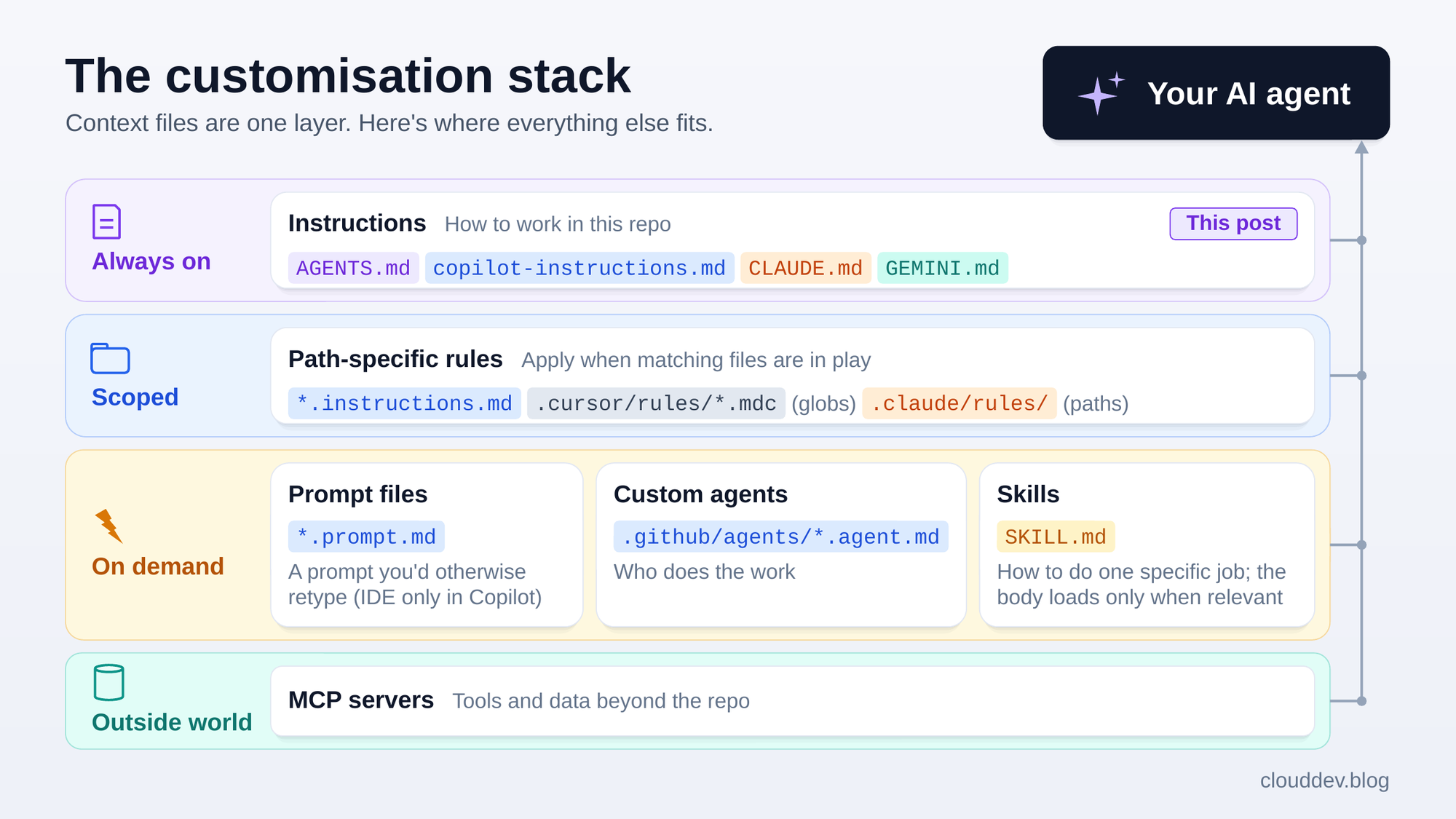
Read it by when each piece loads: instructions are always loaded, rules for selected paths apply when matching files are in play, prompt files, custom agents and skills load on demand, and MCP servers bring in the outside world. Copilot prompt files are available only in IDEs. This post is about the first box; the others deserve posts of their own.
So which file should you actually use?
Here’s the decision guide. Start with the tools your team actually uses, then add more files only when they have a distinct job.
Several tools share the repo
Start with AGENTS.md at the root. Most agents read it natively; Gemini CLI needs context.fileName.
If the team also uses Copilot Chat in Visual Studio, JetBrains, Eclipse or Xcode, keep a matching .github/copilot-instructions.md. Those surfaces don’t read AGENTS.md as of October 2026, so keep the overlap deliberate and consistent.
Everyone uses Copilot
Use .github/copilot-instructions.md for the widest support. AGENTS.md is also an option if you only use VS Code, Copilot CLI and the cloud agent.
Different parts of the repo need different rules
For Copilot, use .github/instructions/*.instructions.md with applyTo globs. Cursor’s .mdc globs and Claude Code’s .claude/rules/ do the same job. In a monorepo, nested AGENTS.md files can specialise the root guidance for each package.
You need a bridge for one tool
For instructions just for Claude, use a CLAUDE.md that imports @AGENTS.md. Without that import, adding CLAUDE.md stops Claude Code reading the shared file.
For Gemini CLI’s default setup, use GEMINI.md, or add your shared AGENTS.md to context.fileName.
You need a specialist or a repeatable workflow
Use .github/agents/*.agent.md for a named Copilot specialist you select from the agents dropdown or with /agent.
Use SKILL.md for a workflow such as deployment or a release. It loads when needed instead of adding the whole procedure to every session.
A conservative setup while the evidence is mixed
The research doesn’t prove this setup performs better. I recommend it because it’s simple, portable and easy to audit, and it keeps the default context small while preserving the project rules you know matter:
- Start with one lean source of truth:
AGENTS.mdwhen several tools share the repo, or.github/copilot-instructions.mdif everyone is on Copilot. Keep it to 20 to 30 lines of rules the agent cannot infer, and confirm that each tool actually reads it, natively or through a documented bridge. - Add rules for particular paths only when you need them: distinct frontend and backend conventions, a
/generatedfolder, and so on. Use*.instructions.mdwithapplyTo, nestedAGENTS.md, or Cursor.mdcglobs. - Add another tool’s file only for a bridge or a unique feature: a
CLAUDE.mdimport, Gemini’scontext.fileName, or acopilot-instructions.mdfor Copilot Chat outside VS Code. Don’t duplicate shared content without a reason.
That’s it: one source of truth and targeted overrides where you need them. Then check that it’s earning its place. The file exists to stop specific, recurring mistakes, so watch for them: if you’ve stopped typing a correction, that line is working; if the agent keeps making the mistake, rewrite the line or delete it. Treat every additional paragraph loaded by default as a cost/benefit hypothesis, not as automatically helpful context.
Audit what you already have. Claude Code’s
/doctor prompt-auditchecks yourCLAUDE.md,CLAUDE.local.mdandAGENTS.mdfiles for references to files or commands that don’t exist and for instructions that contradict each other. The Context Health page in the AI Engineering Coach adds a readiness checklist and uses AI to review your instruction files.
The honest limits
Same candour as always, because this is where trust is built:
- Guidance is not enforcement. Tell Copilot “never use
any“ and it usually complies, but it can still slip one in. Anthropic’s docs put it plainly: Claude treats these files “as context, not enforced configuration”. Real enforcement needs human review, hooks or CI. - Keep it lean. Start at 20 to 30 lines. Anthropic suggests keeping each
CLAUDE.mdunder 200 lines, Cursor suggests keeping each rule under 500, and Codex stops adding project files at 32 KiB combined by default. - Redundancy can be a tax. Study B measured 20% to 23% higher inference cost for generated files. That isn’t a fixed penalty for every long file, but every line is a hypothesis about information the agent needs.
- Validate every command. A stale command in your context file actively misleads the agent.
- Avoid contradictions between overlapping files (root vs nested,
AGENTS.mdvsCLAUDE.md,AGENTS.mdvscopilot-instructions.md). Several tools resolve them unpredictably. - Don’t blindly generate the whole file.
/initand its equivalents are a fine starting point; then trim hard. In Study B, generated context files didn’t improve success and did raise cost.
My take
After digging through the vendor docs and both studies, I’ve landed somewhere less exciting than a headline like “AGENTS.md makes agents 28% faster”, and a lot more useful.
The file you pick matters less than what you put in it. Choose the format your tools actually read, keep one source of truth, and spend your effort on the 20 or 30 lines an agent genuinely can’t work out for itself: the test command that actually works, the folder it must never touch, the response shape your API promises. That’s the part both studies agree on. Everything else is narration, and when billing is based on usage, narration rides along on every model call.
The landscape is also moving fast. Claude Code started reading AGENTS.md this year, Windsurf became Devin Desktop, and Copilot’s coding agent became the cloud agent. So treat your context file like code: version it, review it, delete the lines that stop earning their place, and check which tools read it every few months. This is the context layer: operating knowledge for agents, kept in version control. Keep it lean, keep it accurate, and check whether it improves the work you actually do.
Key takeaways
- Instructions change agent behaviour, but they don’t reliably improve correctness, speed or cost in every setup.
AGENTS.mdis the portable format, now read natively by most major agents, including recent versions of Claude Code when there’s noCLAUDE.md. Gemini CLI needs one setting.- Copilot’s own files still matter.
copilot-instructions.mdis the main instructions file Copilot Chat reads outside VS Code; rules for matching paths, custom agents and skills layer on top. - Within an
AGENTS.mdhierarchy, the nearest file specialises its parents. Across formats, precedence varies by tool and is sometimes arbitrary, so avoid contradictions. - One Codex study found lower runtime and output tokens with an
AGENTS.md; a study covering several agents found context files didn’t generally improve success and raised inference cost by more than 20%. - Under Copilot’s current billing, every model call in an agent task is metered. Fewer calls, less context and fewer failed sessions can reduce spend.
- Start with one lean source of truth, add rules for particular paths when needed, and keep extra files for a bridge or a distinct feature. A line that stops a recurring mistake earns its place; a line that doesn’t is just cost.
References
- AGENTS.md: the open format
- Writing useful agent instructions, GitHub Blog
- AGENTS.md and coding agent efficiency, Lulla et al. (2026)
- Evaluating repository context files, Gloaguen et al. (2026)
- Custom instructions support matrix, GitHub Docs
- Custom agents configuration, GitHub Docs
- Copilot billing for individuals, GitHub Docs
- Custom instructions with AGENTS.md, OpenAI Codex Docs
- How Claude remembers your project, Claude Code Docs
- Context with GEMINI.md files, Gemini CLI Docs
- Rules, Cursor Docs
- Agent Skills specification
Related posts
- The Four Types of GitHub Copilot Agents Explained
- AI Engineering Coach: Measure How You Actually Code with AI
Image Credits
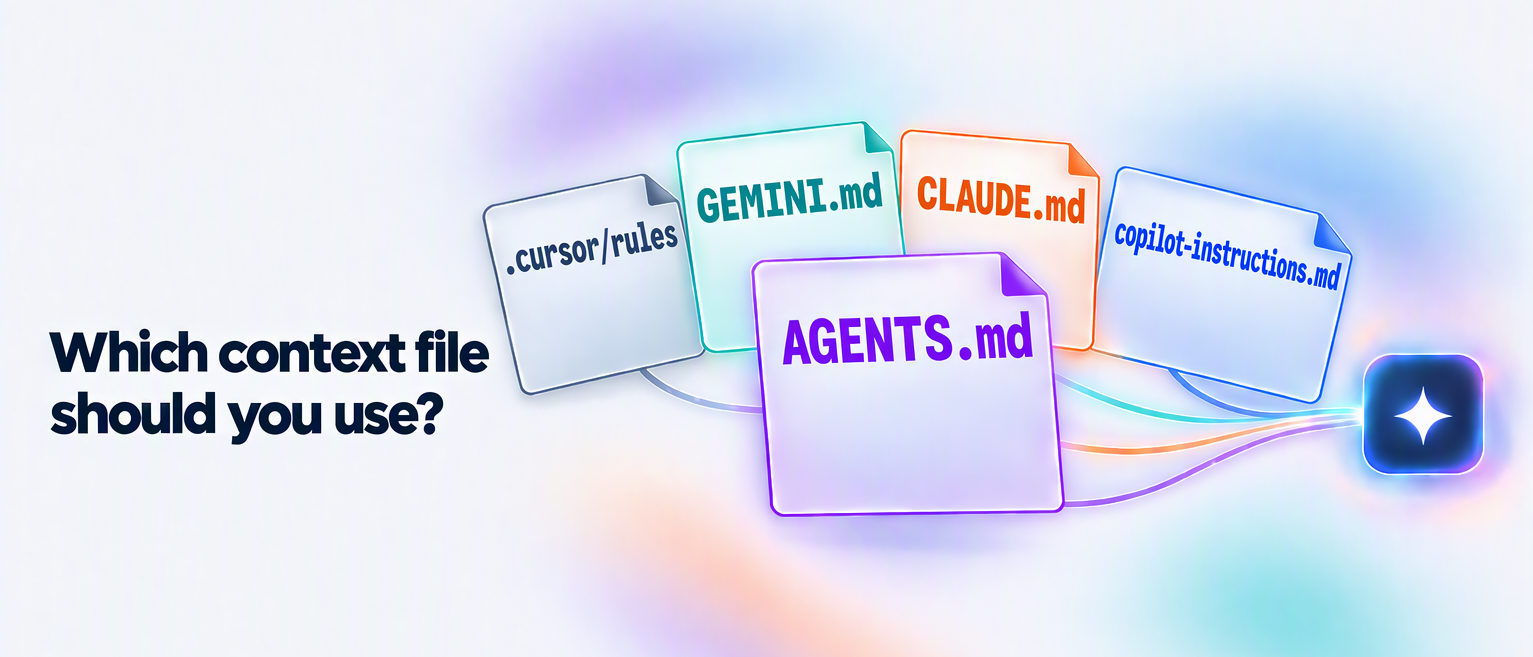
- Cover image generated by Copilot
AGENTS.md vs Copilot Instructions vs Cursor Rules vs CLAUDE.md: Which AI Context File to Use, and When (2026)