AI Agents Exploit Leaked Keys in Minutes: Go Keyless on Azure

AI Agents Exploit Leaked Keys in Minutes: Go Keyless on Azure

TL;DR

A recent threat intelligence report describes an AI agent moving from searching GitHub for application secrets to exfiltrating Azure Key Vault data in five minutes. That’s one observed case, not a typical benchmark.

Use managed identities and federation instead of stored credentials, then disable key authentication once callers have migrated. Tokens can still be stolen, so least privilege, monitoring and incident response remain essential.

I spend a lot of my time in the layer between AI agents and the things they call. A model key in an app setting can look like a harmless shortcut during a proof of concept, but the gap between a leak and the response is getting harder to defend.

In a hurry? Jump to the keyless playbook or the nine checks before release, then come back for the threat and the tradeoffs. The product guidance below was checked on 15 November 2026.

What the threat intelligence report found

On 5 November, Microsoft Threat Intelligence reported that threat actors were using agentic tooling to search public GitHub repositories for exposed credentials, including application secrets and AI inference API keys. The agents analysed the results and carried out follow-on actions with little human intervention.

A stolen model key can fund someone else’s inference, while an exposed application secret can open whatever its identity is permitted to reach.
Read more
GitHub Copilot CLI vs Local vs Cloud: Agents Explained (2026)

GitHub Copilot CLI vs Local vs Cloud: Agents Explained (2026)

TL;DR

The four agent types I described in January are no longer the right map for VS Code. Choose a harness, where the session runs and a model, then set the role and permissions.

The Copilot harness is now the default. It shares a runtime with other Copilot products and runs through the Agent Host, so a session can outlive its editor window, but not a stopped host.

Cloud sandboxes let work continue without your laptop. Under GitHub AI Credit billing, sub-agents consume tokens at their own models’ rates, so context isolation is still useful, but it isn’t free.

Comparing GitHub Copilot CLI vs Local vs cloud? They aren’t three equivalent agent types. Copilot CLI is a terminal interface, Local is a VS Code harness, and cloud describes where the agent’s tools run. The Copilot SDK is the programmable way to embed the Copilot runtime in your own application, not another execution location.

This is Part 2 of my GitHub Copilot agents guide: the current comparison, including what changed since the original four types.

In a hurry? Jump to the updated decision guide, then come back for the architecture and the money bit.

Ten months is a long time in agent land

When Part 1 went out on 10 January, I split GitHub Copilot agents into Local, Background, Cloud and Sub-agents. It was a useful way to explain the workflows, but it mixed together where an agent ran, how you interacted with it and how it delegated.

Since then, VS Code has moved to weekly releases, GitHub has rebuilt Copilot billing, and the old boxes have stopped lining up with the controls in front of us.

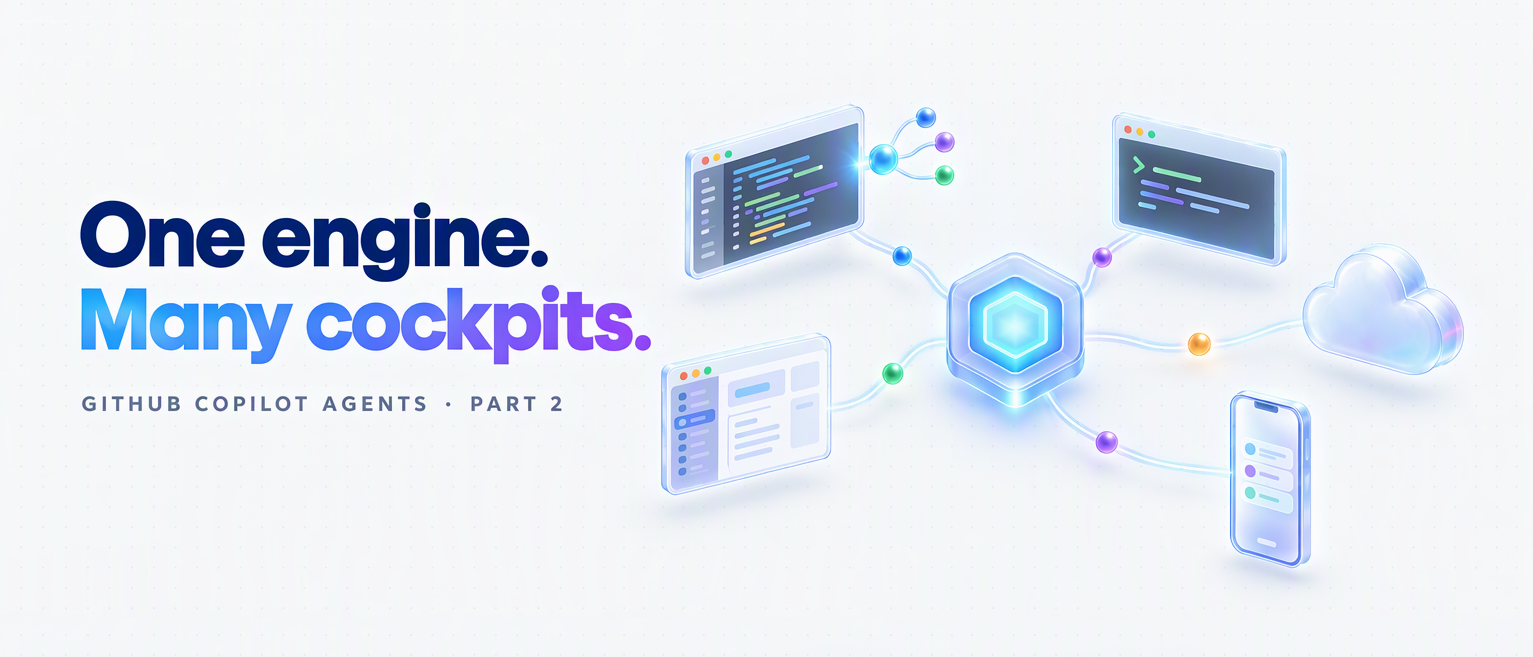
The better mental model is one Copilot engine with many cockpits, alongside other providers’ harnesses. This post is a November 2026 snapshot, checked against the primary sources on 3 November, covering VS Code 1.144 and GitHub’s 28 October cloud rollout.

Read more
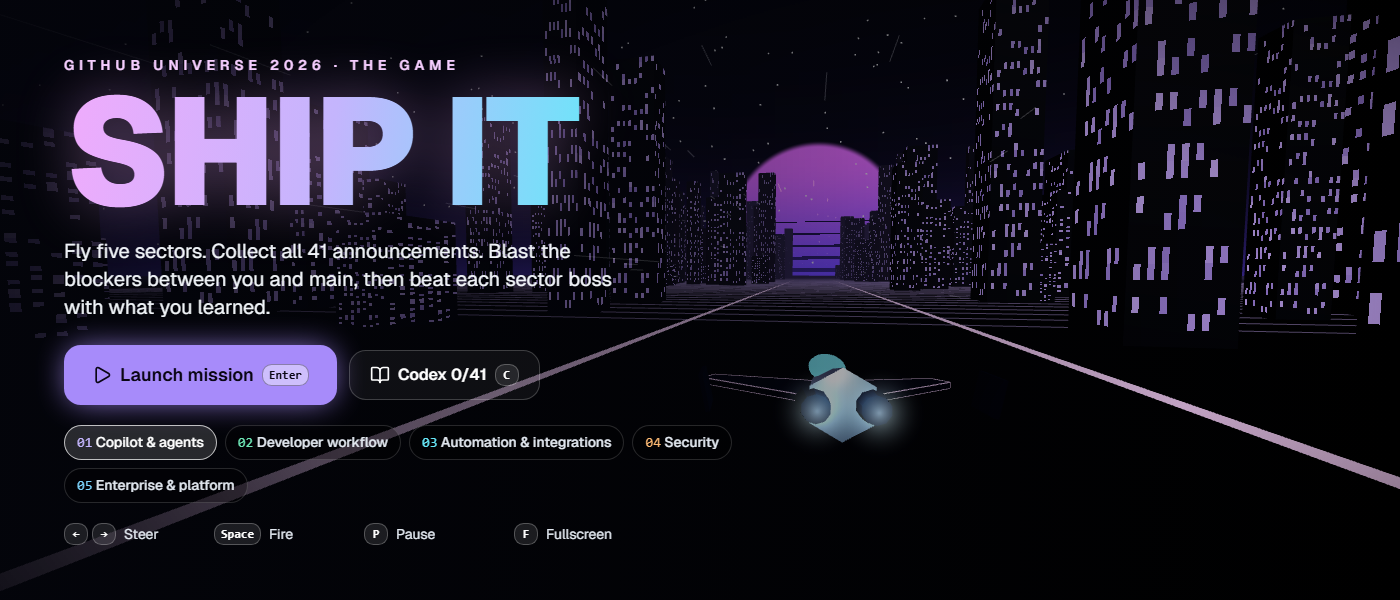
Play SHIP IT: The GitHub Universe 2026 Announcements Game

Play SHIP IT: The GitHub Universe 2026 Announcements Game

GitHub Universe 2026 brought a stack of updates across Copilot, developer workflows, automation, security and platform engineering. I built a more entertaining way to catch up.

SHIP IT is a 3D arcade game with five sectors and all 41 announcements from Universe 2026. Fly through the sectors, collect announcement cores, blast the blockers and beat each boss with what you learned.

GitHub Universe 2026, playable

Ready, player one?

Open the game, launch your mission and discover the announcements on the way to the main branch.

Play SHIP IT

No download. No sign-in. Keyboard and touch controls included.

Your mission

Each sector turns a major Universe theme into an arcade run. Collecting a core unlocks the announcement behind it, including the problem it solves, how it works, why it matters, availability and official links.

Miss an announcement and it circles back once. Finish a sector and you face a short quiz boss. Every answer, right or wrong, reveals the correct update, so the game keeps moving even when you miss one.

The Announcement Guide keeps everything you unlock in this browser. If you want the straight recap, open the Guide and turn on Show every announcement.

How to play

  • Use the left and right arrows or A and D to steer, then hold Space to fire.
  • Press Enter to start or continue, 1, 2 or 3 to answer a boss question and F for fullscreen.
  • On a phone or tablet, swipe to steer and tap to fire. On-screen controls appear automatically.

I designed and built SHIP IT as an independent interactive recap of GitHub Universe 2026. It is not an official GitHub product.

Read more
AGENTS.md vs Copilot Instructions vs Cursor Rules vs CLAUDE.md: Which AI Context File to Use, and When (2026)

AGENTS.md vs Copilot Instructions vs Cursor Rules vs CLAUDE.md: Which AI Context File to Use, and When (2026)

TL;DR

  • AGENTS.md is the portable format for project instructions. Most major coding agents read it; Gemini CLI needs a setting.
  • Copilot also has its own instructions, rules for matching paths, custom agents and skills. .github/copilot-instructions.md reaches the most Copilot surfaces.
  • Within an AGENTS.md hierarchy, the nearest applicable file specialises its parents. Your explicit chat instructions take priority for the task.
  • Context files change agent behaviour. The research does not show that they reliably improve correctness, speed or cost.

Keep one lean source of verified project rules: AGENTS.md when several tools share the repo, or copilot-instructions.md for a Copilot team. Treat it as an operating guide, not a performance switch.

In a hurry? Jump to the quick comparison, then come back for precedence, the research and the decision guide.

If you use an AI coding agent every day, whether that’s GitHub Copilot, Cursor, Claude Code, Codex or Gemini CLI, you’ve felt this particular flavour of tedium: you keep typing the same rules into every prompt.

“Use Vitest, not Jest. Don’t touch /legacy. Named exports only. Return { data, error } from every endpoint.”

The agent obeys for one session, you close your editor, and tomorrow you type it all again. That isn’t a prompting problem. It’s a missing context layer: the middle tier between what you ask in the moment (the prompt) and the whole system you build around the model (the harness).

That layer has a name now. Several names, actually, and that’s exactly the problem: AGENTS.md, copilot-instructions.md, .cursorrules, CLAUDE.md, GEMINI.md, Skills, custom agents. They overlap, they compete, and they keep moving. In 2026 alone, Claude Code started reading AGENTS.md, Windsurf became Devin Desktop, and Copilot’s coding agent became the cloud agent. Almost nobody explains how they fit together or which one you should actually use.

This post untangles all of it: what each file is, how they interact, what the research says about whether they even work, and, most importantly, which file to reach for, and when.

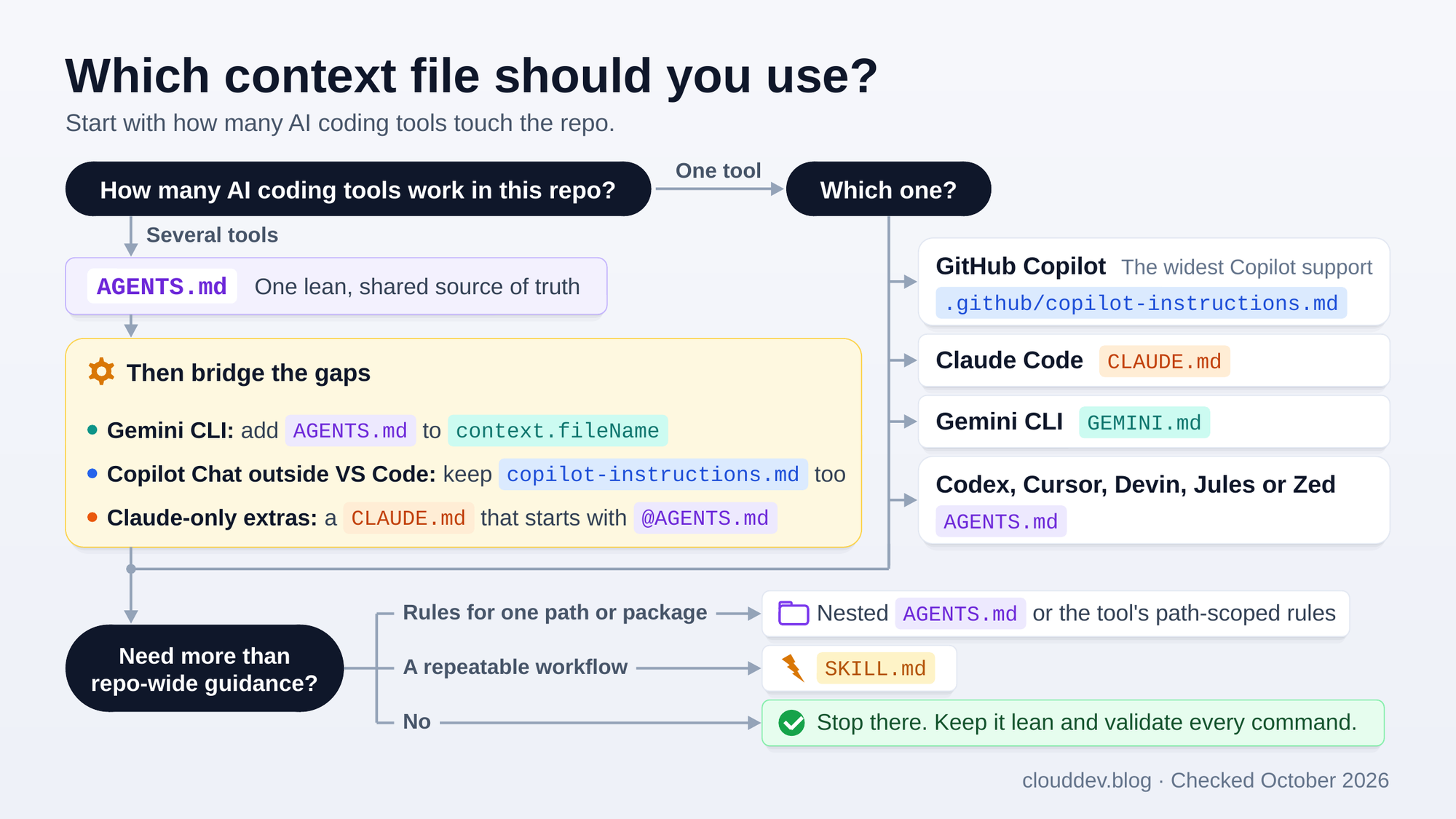
TL;DR diagram: which file should you use?

Here’s the whole decision on one page. The rest of the post explains every box in it.

Decision tree for choosing an AI context file. With one tool: GitHub Copilot uses .github/copilot-instructions.md, Claude Code uses CLAUDE.md, Gemini CLI uses GEMINI.md, and Codex, Cursor, Devin, Jules or Zed use AGENTS.md. With several tools: one lean AGENTS.md as the shared source of truth, then bridges for Gemini CLI, Copilot Chat outside VS Code and instructions just for Claude. Nested files, rules for matching paths and SKILL.md files come only when you need them.

For example, Copilot in VS Code and Claude Code can share one AGENTS.md when there’s no CLAUDE.md. A Copilot team can start with .github/copilot-instructions.md. Cursor users alongside Copilot Chat in Visual Studio need both. A deploy or release procedure belongs in a SKILL.md, whichever instructions the repo uses.

Read more
The Four Types of GitHub Copilot Agents: Local, Background, Cloud, and Sub-Agents Explained

The Four Types of GitHub Copilot Agents: Local, Background, Cloud, and Sub-Agents Explained

Update (November 2026): this post is now out of date

A lot has changed since January. The "four agent types" model below no longer matches VS Code: you now choose a harness (Copilot, Local, Claude or Codex), where it runs and a model. Local and Background workflows have converged on the new default Copilot harness. The coding agent is now Copilot cloud agent, and the newer cloud experience defaults to a managed sandbox where that choice is offered.

Copilot moved to GitHub AI Credits on 1 June 2026. Under usage-based billing, sub-agent model calls are metered too, so they are no longer "effectively free". Some existing annual plans remain on legacy billing until they end.

Read Part 2: GitHub Copilot CLI vs Local vs Cloud: Agents Explained (2026)

I've left the original below as a January 2026 snapshot, with short notes where something has changed or needed correcting.


🎯 TL;DR: Four Agent Types, Four Different Workflows

GitHub Copilot in VS Code now supports four distinct agent types, each designed for different workflows and levels of autonomy. Local Agent is your interactive coding partner, running in VS Code with full access to all your tools, MCP servers, and three personas (Agent, Plan, Ask). Coding Agent (Cloud) runs on GitHub’s cloud infrastructure via Actions runners, works fully autonomously on issues, and creates PRs while you’re away. Background Agent (Copilot CLI) runs locally but outside the VS Code process; it survives restarts, supports parallel sessions, and can hand off work to cloud agents with /delegate. Sub-Agents are the secret weapon for context management, running as isolated subtasks within a parent agent session, keeping the main agent’s context window clean while handling research, analysis, or parallel tasks.

Key insight: If you’re using a 1x premium model like Claude Sonnet 4, sub-agent calls are effectively free, making them the most cost-efficient way to scale complex multi-step workflows without burning through your premium request budget.

No longer true under AI Credit billing (November 2026): Copilot moved to usage-based billing on 1 June, and sub-agent model calls consume credits too. Claude Sonnet 4 was retired on 6 May. Part 2 explains the current costs and legacy annual-plan exceptions.


GitHub Copilot has evolved far beyond simple code completions. With agent mode in VS Code, developers gained an autonomous coding assistant that could plan, execute, and iterate on complex tasks. But as workflows grew more sophisticated, a single agent type wasn’t enough to cover every scenario, from quick interactive debugging to full autonomous issue resolution that runs while you sleep.

Today, GitHub Copilot in VS Code supports four distinct agent types, each optimized for different workflows, contexts, and levels of autonomy. Understanding when to use each one, and how they interact, is the difference between fighting your tools and having them work seamlessly for you.

Read more
Deploying To IP Restricted Azure Function Apps Using GitHub Actions

Deploying To IP Restricted Azure Function Apps Using GitHub Actions


🎯 TL;DR: Dynamic IP Management for CI/CD to Secured Azure Functions

IP-restricted Function Apps block GitHub Actions runners causing HTTP 403 deployment failures since runners use dynamic IP addresses. Problem: Cannot whitelist entire GitHub IP range due to frequent changes. Solution: Dynamic IP management in GitHub Actions workflow using Azure CLI to temporarily add runner IP to SCM site access restrictions, deploy code, then remove IP. Implementation uses ipify API for IP detection, --use-same-restrictions-for-scm-site false for SCM isolation, and automated cleanup to maintain security posture.


In the previous post we blocked our function app to be available only to the APIM via ip restrictions.

This secures our function app and it isn’t available publicly, any one that tries to access our function app url will get “HTTP 403 Forbidden”.

This secures our function app; now what about deploying code changes to the function app via GitHub Actions? we should be able to CI/CD to our function app, but there is a problem here. The GitHub action will fail with the same “HTTP 403 Forbidden”, this is because GitHub actions run on runners (its a hosted virtual environment), each time we run the Action we get a new runner and it can have a different ip address. So how can we get around this? do we white list the entire GitHub ip range?

GitHub’s ip ranges can change any time, so will have to keep scanning for changes to these ranges and proactively update our ip restrictions, this is not very scalable or practical. So what are other ways of getting around this? we have a couple of ways to get around this.

Possible Solutions

There are two viable solutions here

Read more
Securing Azure Functions and Logic Apps

Securing Azure Functions and Logic Apps


🎯 TL;DR: Cost-Optimized Security for Serverless Microservices

Consumption plan Function Apps and APIM Standard lack VNet integration for cost optimization but expose services publicly. Problem: Serverless microservices accessible directly bypassing API Management security policies. Solution: IP restriction-based security using APIM’s public IP address to whitelist only API Management access, configuring both main site and SCM site restrictions. Architecture includes Azure Front Door for WAF capabilities since APIM Standard lacks native WAF protection.


Here is a scenario that I recently encountered. Imagine we are building micro-services using serverless (a mix on Azure Function Apps and Logic Apps) with APIM in the front. Lets say we went with the APIM standard instance and all the logic and function apps are going to be running on consumption plan (for cost reasons as its cheaper). This means we wont be getting any vnet capability and our function and logic apps will be exposed out to the world (remember to get vnet with APIM we have to go with the premium version, we are going APIM standard here for cost saving reasons).

So how do we restrict our function and logic apps to only go through the APIM, in another words all our function and logic apps must only go through the APIM and if anyone tries to access them directly they should be getting a “HTTP 403 Forbidden”.

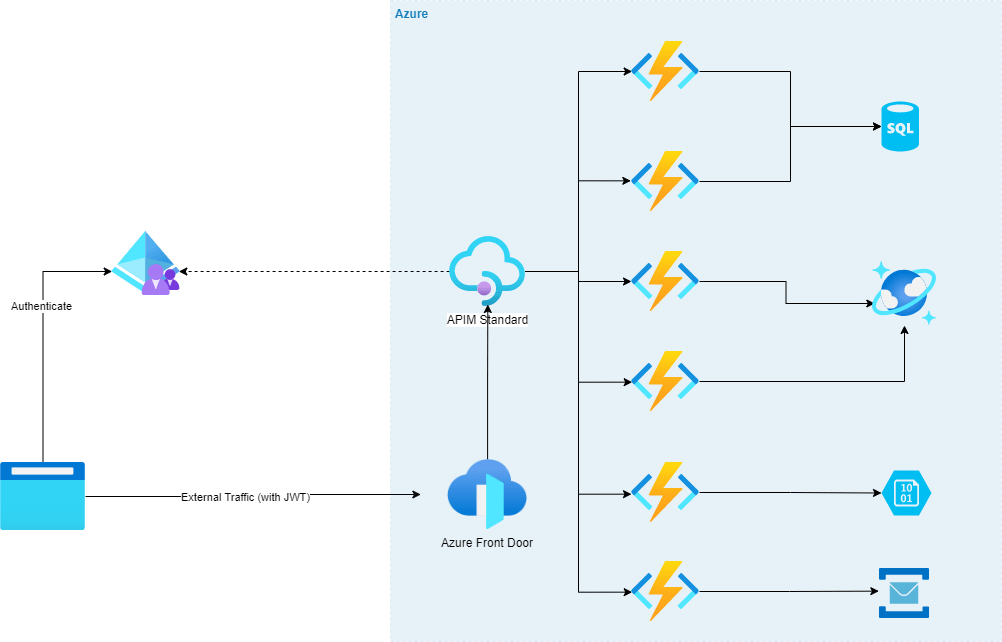
Lets visualize this scenario; We have some WAF capable ingress endpoint, in this case its Azure Front Door, that is forwarding traffic to APIM which then sends the requests to the serverless apps.
Reason for having Front Door before APIM is because APIM doesn’t have WAF natively so we will need to put something in front of it that has that capability to be secure.

There are few options like Azure Firewall, Application Gateway etc, but for the purposes of this scenario we have Azure Front Door in front of APIM (and we can have an APIM policy that will only accept traffic from Azure Font Door, we wont be going in to that, we will keep it to securing our function apps to just being available via APIM for today)

Read more

Choose your design

Only the look changes. Your posts, ads, comments and other integrations stay in place, with the same light/dark and cookie preferences.

Choose the look you prefer