Preserving Custom Query String Parameters Through Azure App Service Easy Auth

Preserving Custom Query String Parameters Through Azure App Service Easy Auth


🎯 TL;DR

Azure App Service’s built-in authentication (“Easy Auth”) preserves the original path and query string, every custom parameter included, across the Microsoft Entra ID OAuth round trip. Your app gets the request back with the query string fully intact and zero authentication code. (URL fragments need a separate opt-in, see Gotchas.)

The mechanism is the standard OAuth 2.0 state parameter: Easy Auth encodes the original path + query into state, Entra echoes it back, Easy Auth 302s the browser to the original URL after sign-in.

Bonus finding from the captured traces: an inbound login_hint on the request is forwarded to Entra so the sign-in page is pre-populated, no loginParameters configuration needed.

Full reproducible scenario (Bicep + sample app + deploy scripts) in the Azure Scenario Hub: src/app-service-easy-auth. Clone, ./deploy-infra.ps1, watch the round-trip in your own browser in ~3 minutes.

A question I ran into recently:

If we put a login_hint, a recordId, and a bunch of other custom things in the query string, and let Easy Auth redirect to Entra for sign-in, will those query string parameters come back to us after authentication? Or do we have to write code to stash them somewhere first?

The answer is yes, they come back, and no, you don’t have to write any code. Easy Auth handles it natively. This post walks through how, with HTTP traces captured byte-for-byte from a live deployment, all reproducible from the Azure Scenario Hub.


Read more
Deploying To IP Restricted Azure Function Apps Using GitHub Actions

Deploying To IP Restricted Azure Function Apps Using GitHub Actions


🎯 TL;DR: Dynamic IP Management for CI/CD to Secured Azure Functions

IP-restricted Function Apps block GitHub Actions runners causing HTTP 403 deployment failures since runners use dynamic IP addresses. Problem: Cannot whitelist entire GitHub IP range due to frequent changes. Solution: Dynamic IP management in GitHub Actions workflow using Azure CLI to temporarily add runner IP to SCM site access restrictions, deploy code, then remove IP. Implementation uses ipify API for IP detection, --use-same-restrictions-for-scm-site false for SCM isolation, and automated cleanup to maintain security posture.


In the previous post we blocked our function app to be available only to the APIM via ip restrictions.

This secures our function app and it isn’t available publicly, any one that tries to access our function app url will get “HTTP 403 Forbidden”.

This secures our function app; now what about deploying code changes to the function app via GitHub Actions? we should be able to CI/CD to our function app, but there is a problem here. The GitHub action will fail with the same “HTTP 403 Forbidden”, this is because GitHub actions run on runners (its a hosted virtual environment), each time we run the Action we get a new runner and it can have a different ip address. So how can we get around this? do we white list the entire GitHub ip range?

GitHub’s ip ranges can change any time, so will have to keep scanning for changes to these ranges and proactively update our ip restrictions, this is not very scalable or practical. So what are other ways of getting around this? we have a couple of ways to get around this.

Possible Solutions

There are two viable solutions here

Read more
Securing Azure Functions and Logic Apps

Securing Azure Functions and Logic Apps


🎯 TL;DR: Cost-Optimized Security for Serverless Microservices

Consumption plan Function Apps and APIM Standard lack VNet integration for cost optimization but expose services publicly. Problem: Serverless microservices accessible directly bypassing API Management security policies. Solution: IP restriction-based security using APIM’s public IP address to whitelist only API Management access, configuring both main site and SCM site restrictions. Architecture includes Azure Front Door for WAF capabilities since APIM Standard lacks native WAF protection.


Here is a scenario that I recently encountered. Imagine we are building micro-services using serverless (a mix on Azure Function Apps and Logic Apps) with APIM in the front. Lets say we went with the APIM standard instance and all the logic and function apps are going to be running on consumption plan (for cost reasons as its cheaper). This means we wont be getting any vnet capability and our function and logic apps will be exposed out to the world (remember to get vnet with APIM we have to go with the premium version, we are going APIM standard here for cost saving reasons).

So how do we restrict our function and logic apps to only go through the APIM, in another words all our function and logic apps must only go through the APIM and if anyone tries to access them directly they should be getting a “HTTP 403 Forbidden”.

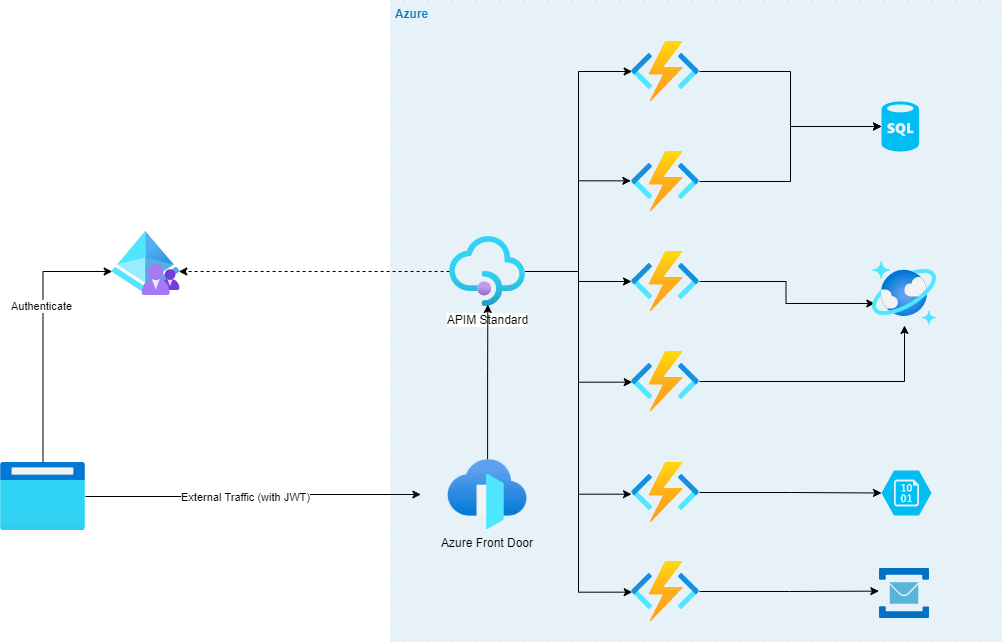
Lets visualize this scenario; We have some WAF capable ingress endpoint, in this case its Azure Front Door, that is forwarding traffic to APIM which then sends the requests to the serverless apps.
Reason for having Front Door before APIM is because APIM doesn’t have WAF natively so we will need to put something in front of it that has that capability to be secure.

There are few options like Azure Firewall, Application Gateway etc, but for the purposes of this scenario we have Azure Front Door in front of APIM (and we can have an APIM policy that will only accept traffic from Azure Font Door, we wont be going in to that, we will keep it to securing our function apps to just being available via APIM for today)

Read more