Azure Logic Apps Timeout

Azure Logic Apps Timeout


🎯 TL;DR: Timeout Control Strategies for Azure Logic Apps

Logic Apps default timeout behavior doesn’t match production requirements with HTTP triggers timing out at 3.9 minutes and workflow duration defaulting to 90 days. Problem: No granular timeout control per workflow causing long-running processes in production. Solutions: Global Runtime.Backend.FlowRunTimeout setting (minimum 7 days, affects all workflows) or per-workflow timeout branches using parallel “Delay” action with terminate condition for precise timeout control without impacting other workflows.


Recently I got pulled into a production incident where a logic app was running for a long time (long time in this scenario was > 10 minutes), but the intention from the dev crew was they wanted this to time out in 60 seconds. These logic apps were a combination of HTTP triggers and Timer based.

Logic App Default Time Limits

First things to keep in mind are some default limits.

  1. If its a HTTP based trigger the default timeout is around 3.9 minutes

  2. For most others the default max run duration of a logic app is 90 days and min is 7 days

Ways To Change Defaults

With that, here are a couple of quick ways to make sure your Logic App times out and terminates within the time frame you set. Lets say if we want our Logic App to run no more than 60 seconds at max then:
Read more
Create A Multi User Experience For Single Threaded Applications Using Azure Container Apps

Create A Multi User Experience For Single Threaded Applications Using Azure Container Apps


🎯 TL;DR: Simulating Multi-User Experience for Legacy Single-Threaded Apps

Legacy single-threaded applications (one request per process) require multi-user support without costly re-architecture. Problem: Applications with static locks block entire process during request handling. Solution: Azure Container Apps with HTTP-based scaling rules that spawn new container instances per concurrent request. Configuration uses min-replicas=0, max-replicas=30 with HTTP scale triggers, achieving 70-90% request isolation across separate container instances for pseudo-multithreaded behavior without code changes.


How to make a single-threaded app multi-threaded? This is the scenario I faced very recently. These were legacy web app(s) written to be single-threaded; in this context single-threaded means can only serve one request at a time. I know this goes against everything that a web app should be, but it what it is.

So if we have a single threaded web app (legacy) now all of a sudden we have a requirement to support multiple users at the same time. What are our options:

  1. Re-architect the app to be multi threaded
  2. Find a way to simulate multi threaded behavior

Both are great options, but in this scenario option 1 was out, due to the cost involved in re-writing this app to support multi threading. So that leaves us with option 2; how can we at a cloud infra level easily simulate multi threaded behavior. Turns out if we containerize the app (in this case it was easy enough to do) we orchestrate the app such that for each http request is routed to a new container (ie: every new http request should spin up a new container and request send to it)

Options For Running Containers

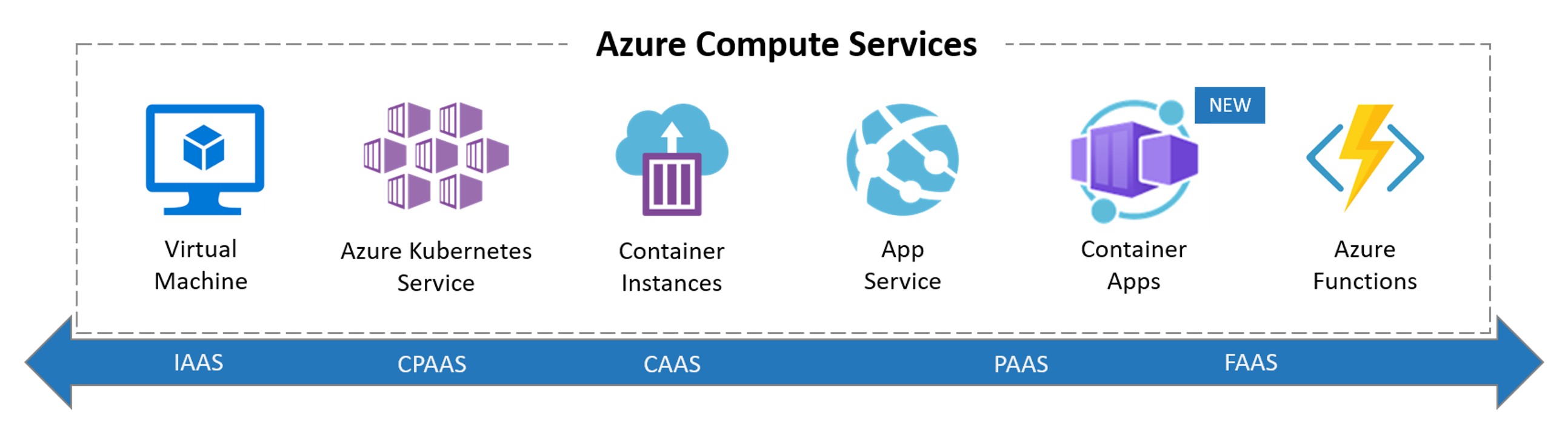
So when it comes to running a container in Azure our main options are below

Read more
Securing Azure Functions and Logic Apps

Securing Azure Functions and Logic Apps


🎯 TL;DR: Cost-Optimized Security for Serverless Microservices

Consumption plan Function Apps and APIM Standard lack VNet integration for cost optimization but expose services publicly. Problem: Serverless microservices accessible directly bypassing API Management security policies. Solution: IP restriction-based security using APIM’s public IP address to whitelist only API Management access, configuring both main site and SCM site restrictions. Architecture includes Azure Front Door for WAF capabilities since APIM Standard lacks native WAF protection.


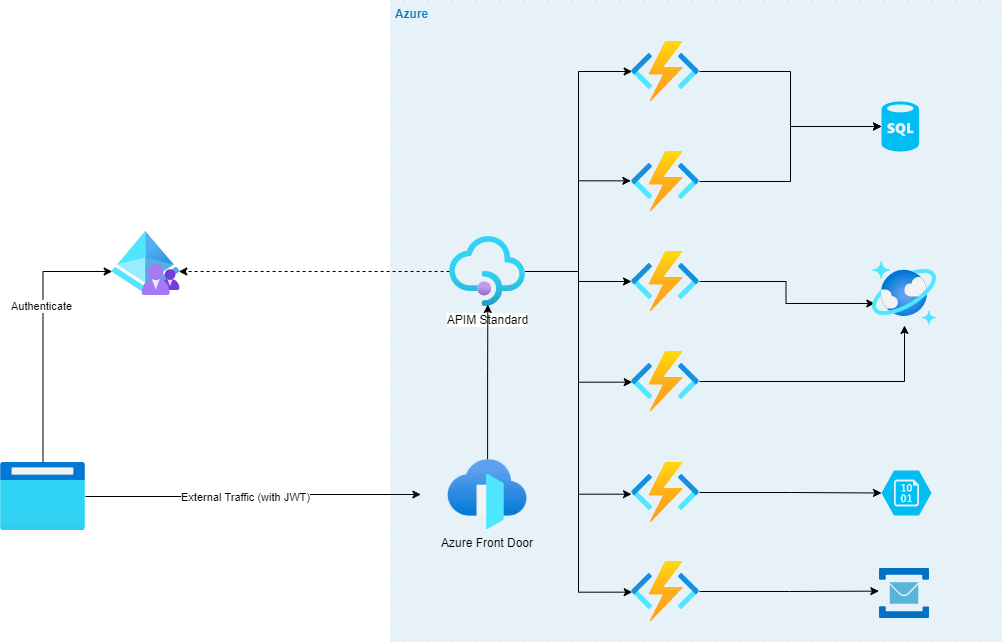
Here is a scenario that I recently encountered. Imagine we are building micro-services using serverless (a mix on Azure Function Apps and Logic Apps) with APIM in the front. Lets say we went with the APIM standard instance and all the logic and function apps are going to be running on consumption plan (for cost reasons as its cheaper). This means we wont be getting any vnet capability and our function and logic apps will be exposed out to the world (remember to get vnet with APIM we have to go with the premium version, we are going APIM standard here for cost saving reasons).

So how do we restrict our function and logic apps to only go through the APIM, in another words all our function and logic apps must only go through the APIM and if anyone tries to access them directly they should be getting a “HTTP 403 Forbidden”.

Lets visualize this scenario; We have some WAF capable ingress endpoint, in this case its Azure Front Door, that is forwarding traffic to APIM which then sends the requests to the serverless apps.
Reason for having Front Door before APIM is because APIM doesn’t have WAF natively so we will need to put something in front of it that has that capability to be secure.

There are few options like Azure Firewall, Application Gateway etc, but for the purposes of this scenario we have Azure Front Door in front of APIM (and we can have an APIM policy that will only accept traffic from Azure Font Door, we wont be going in to that, we will keep it to securing our function apps to just being available via APIM for today)

Read more